 PH
PHDOP Testnet Full Guide
The wait is over

 Backed by BINANCE
 Join DOP testnet
Data Ownership Protocol
Use Mises or Kiwi Browser (DESKTOP mode)
Link:
You do not have permission to view the full content of this post. Log in or register now.
1. Create Wallet
-Save & Verify your Recovery Phrase
-Save your Secret Key
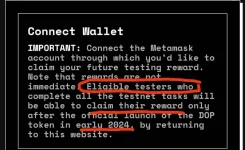
-Connect Metamask
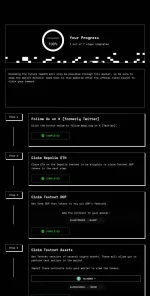
2. Follow DOP on Twitter
-Sign with X
3. Claim Sepolia ETH
4. Claim Testnet DOP
-add DOP contract address to metamask: 0x4873528341D33Ec918c7465F244491aCB75Bc95F
5. Claim Testnet Assets
-add testnet USDT contract address to metamask: 0x523C8591Fbe215B5aF0bEad65e65dF783A37BCBC
6. Encrypt Assets
-Get Started
-Select Address from drop down box,
-select USDT
-put 10000 USDT
-Encrypt, Confirm, Next, Approve, Confirm, Close
7. Send Assets
-Get Started
-Select Address from drop down box,
-select USDT
-put any small amount like 100 USDT
-Send, Confirm, Next, Approve, Confirm, Close
8. Decrypt Assets
-Get Started
-select USDT
-put any small amount like 100 USDT
-input password
-Decrypt, Confirm, Confirm, Close
9. Enter your email to finalize the test
That's it!
Feel free to ask any questions and join our DOP PH Community
PS: If you want to claim more Sepolia ETH, go here:
sepoliafaucet.com

The wait is over
Backed by BINANCEJoin DOP testnetData Ownership Protocol
Use Mises or Kiwi Browser (DESKTOP mode)
Link:
You do not have permission to view the full content of this post. Log in or register now.
1. Create Wallet
-Save & Verify your Recovery Phrase
-Save your Secret Key
-Connect Metamask
2. Follow DOP on Twitter
-Sign with X
3. Claim Sepolia ETH
4. Claim Testnet DOP
-add DOP contract address to metamask: 0x4873528341D33Ec918c7465F244491aCB75Bc95F
5. Claim Testnet Assets
-add testnet USDT contract address to metamask: 0x523C8591Fbe215B5aF0bEad65e65dF783A37BCBC
6. Encrypt Assets
-Get Started
-Select Address from drop down box,
-select USDT
-put 10000 USDT
-Encrypt, Confirm, Next, Approve, Confirm, Close
7. Send Assets
-Get Started
-Select Address from drop down box,
-select USDT
-put any small amount like 100 USDT
-Send, Confirm, Next, Approve, Confirm, Close
8. Decrypt Assets
-Get Started
-select USDT
-put any small amount like 100 USDT
-input password
-Decrypt, Confirm, Confirm, Close
9. Enter your email to finalize the test
That's it!
Feel free to ask any questions and join our DOP PH Community
PS: If you want to claim more Sepolia ETH, go here:
sepoliafaucet.com