 PH
PHAng tutorial na ito ay tumutukoy sa pag resolba nang html file error sa IDM(Internet Download Manager) kung saan hindi na ddownload ang actual file.
Procedure:
If mag ddownload ka nang file halimbawa sa sourc*f*rg* or any source website tapos html ang na ddownload mo instead of the file
click mo muna o e download mo yung file sa browser mo tapos wag mo muna e pause.
Press Ctrl + J key sa Windows keyboard.
mapupunta ka sa Download Management Page nang iyong Browser.
Makikita mo dito ang actual link nang dinadownload mong file.
kagaya nito: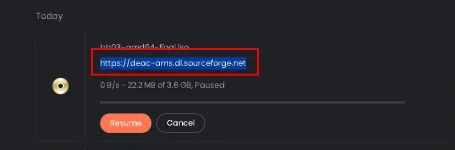
right click and copy the link tapos yan ang gagamitin mo sa IDM app.
tapos pwede mo nang e pause or remove yung dinownload mo s abrowser and proceed to your IDM app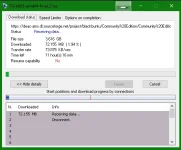
Procedure:
If mag ddownload ka nang file halimbawa sa sourc*f*rg* or any source website tapos html ang na ddownload mo instead of the file
click mo muna o e download mo yung file sa browser mo tapos wag mo muna e pause.
Press Ctrl + J key sa Windows keyboard.
mapupunta ka sa Download Management Page nang iyong Browser.
Makikita mo dito ang actual link nang dinadownload mong file.
kagaya nito:
right click and copy the link tapos yan ang gagamitin mo sa IDM app.
tapos pwede mo nang e pause or remove yung dinownload mo s abrowser and proceed to your IDM app