 PH
PHNo liabilities
Elite
I posted this tutorial to improve your streaming speed and avoid much buffering to watch iptv streaming as I have posted 5 threads about iptv playlists used on iptv smarters pro..
Imagine you’re a Netflix subscriber living in New York City, and you go on holiday to Paris. While in France, you may be unable to watch your favorite gripping thriller as it’s only available to US subscribers.
But with a VPN, you can change your public-facing IP address to make it look like you’re back in the US. That way, you can keep up with the plot wherever you travel.
But not only governments cramp your style online. Companies, schools, and universities often block streaming services and entertainment websites. With a VPN, you can unlock the web and be free to stream what you like.
A VPN can help you beat this You do not have permission to view the full content of this post. Log in or register now.. By encrypting your internet traffic, a VPN hides what you’re doing from your ISP, making it less likely to slow down your connection.
1. Go to You do not have permission to view the full content of this post. Log in or register now.
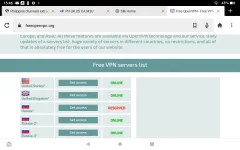
2. Select a country which is similar to your playlist server timezone. If you dont know what is your playlist's server timezone. Just select the country category from your playlist from which the iptv live channels are from.
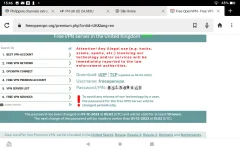
3. Click the country and write down the username and password and download the certificate file whether udp or tcp you can download any of the two options.
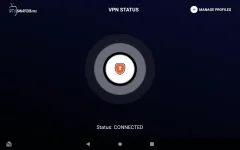
4. Open smarters pro modded apk installed on your device, go to settings and click vpn
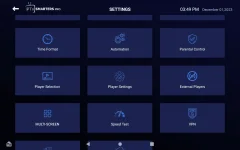
5. Upload certificate that you have downloaded, click import and enter the username and password.
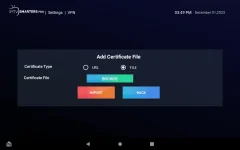
7. Click connect.. Then go back to your playlist and watch the live channels..
Why use a VPN when streaming?
Here’s why you need a VPN to safely stream your favorite TV shows and movies from anywhere:1. Watch geoblocked content when you’re abroad
If you travel abroad, you might find you can’t watch your favorite movies and shows online. That’s because many streaming services restrict the content available in different countries based on your IP address, what’s known as “geoblocking”.Imagine you’re a Netflix subscriber living in New York City, and you go on holiday to Paris. While in France, you may be unable to watch your favorite gripping thriller as it’s only available to US subscribers.
But with a VPN, you can change your public-facing IP address to make it look like you’re back in the US. That way, you can keep up with the plot wherever you travel.
2. Stream on restricted networks
Some authoritarian states use IP addresses to restrict the internet content available to their citizens. By using a good VPN, you can bypass censorship and freely stream what you like to access the truth.But not only governments cramp your style online. Companies, schools, and universities often block streaming services and entertainment websites. With a VPN, you can unlock the web and be free to stream what you like.
3. Avoid bandwidth throttling
Streaming can take up a lot of data. That’s why your internet service provider (ISP) may intentionally slow down, or “throttle”, your connection if it sees you’re streaming when the network is busy.A VPN can help you beat this You do not have permission to view the full content of this post. Log in or register now.. By encrypting your internet traffic, a VPN hides what you’re doing from your ISP, making it less likely to slow down your connection.
1. Go to You do not have permission to view the full content of this post. Log in or register now.
2. Select a country which is similar to your playlist server timezone. If you dont know what is your playlist's server timezone. Just select the country category from your playlist from which the iptv live channels are from.
3. Click the country and write down the username and password and download the certificate file whether udp or tcp you can download any of the two options.
4. Open smarters pro modded apk installed on your device, go to settings and click vpn
5. Upload certificate that you have downloaded, click import and enter the username and password.
7. Click connect.. Then go back to your playlist and watch the live channels..

