❓ Help Need some suggestion in html/css

Hdiahs682h

Honorary Poster
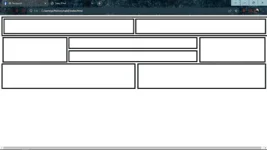
<!DOCTYPE html> <html> <head> <meta charset="utf-8"> <meta name="viewport" content="width=device-width, initial-scale=1"> <title>Semi Final</title> <link rel="stylesheet" type="text/css" href="style.css"> </head> <body> <div id=sqr1> <div id=sqr2> </div> <div id=sqr3> </div> </div> <div id=sqr4> </div> <div id=sqr5> </div> <div id=sqr6> </div> <div id=sqr7> </div> <div class="sqr"> <div id=sqr8> </div> <div id=sqr9> </div> </div> </body> </html>
#sqr1{
height: 80px;
width: 100%;
border: 5px solid black;
padding: 5px;
margin-bottom: 5px;
}
#sqr2{
height: 70px;
width: calc(50% - 16px);
border: 5px solid black;
float:left;
}
#sqr3{
height: 70px;
width: calc(50% - 16px);
border: 5px solid black;
margin-left: 5px;
float: left;
}
#sqr4{
height: 120px;
width: calc(25% - 16px);
border: 5px solid black;
margin-left: 5px;
float: left;
}
#sqr5{
height: 50px;
width: calc(50% - 25px);
border: 5px solid black;
margin-left: 5px;
float: left;
}#sqr6{
height: 50px;
width: calc(50% - 25px);
border: 5px solid black;
float: left;
margin: 8px 5px;
}#sqr7{
height: 120px;
width: calc(25% - 9px);
border: 5px solid black;
margin-left: 5px;
float: left;
position: relative;
bottom: 60px;
margin-bottom: 5px;
}
.sqr{
margin-top: 140px;

}
#sqr8{
height: 120px;
width: 50%;
border: 5px solid black;
margin-bottom: 5px;
}
#sqr9{position: relative;
left: 695px;
bottom: 135px;
height: 120px;
width: 48%;
border: 5px solid black;
}



387484572_273119301983274_4031035014165018989_n.webp

1.webp
 
The HTML code you provided creates a layout with multiple square elements using divs. Each square has a unique ID or class assigned to it.

The CSS code you provided styles each square element according to its ID or class. Here's a breakdown of the CSS styles:

  • #sqr1 sets the height, width, border, padding, and margin properties for the first square.
  • #sqr2 and #sqr3 set the height, width, border, and float properties for two squares that are side by side.
  • #sqr4 sets the height, width, border, margin, and float properties for the fourth square.
  • #sqr5 sets the height, width, border, margin, and float properties for the fifth square.
  • #sqr6 sets the height, width, border, margin, float, and position properties for the sixth square.
  • #sqr7 sets the height, width, border, margin, float, position, and bottom properties for the seventh square.
  • .sqr sets the margin-top property for all elements with the class "sqr".
  • #sqr8 sets the height, width, border, and margin properties for the eighth square.
  • #sqr9 sets the position, left, bottom, height, width, and border properties for the ninth square.

Overall, the CSS styles create a layout with different-sized squares positioned in various ways. Some squares are floated, others have relative positioning, and some have specific margins and padding.

If you have any specific questions or need further assistance, feel free to ask!
 

About this Thread

  • 1
    Replies
  • 417
    Views
  • 1
    Participants
Last reply from:
Unknown user

Trending Topics

Online now

Members online
541
Guests online
697
Total visitors
1,238

Forum statistics

Threads
2,274,614
Posts
28,957,239
Members
1,234,356
Latest member
wiloianm171
Back
Top