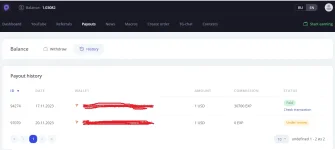
PH
PHEARN BY WATCHING YOUTUBE VIDEOS !
REGISTER HERE: You do not have permission to view the full content of this post. Log in or register now.
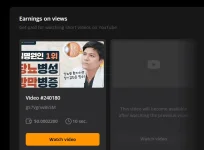
10 SEC VIDEO = 0.0002200 USD
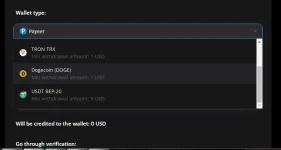
WITHDRAWAL METHOD AND MINIMUM WITHDRAWAL: PICTURE BELOW !

SA MGA MOBILE USER ITO PWEDE GAWING PARA MAG AUTO VIEW VIDEO:
How to install WorkerCash MACROS on an Android smartphone
WorkerCash MACROS allows you to automatically view videos on a smartphone with the Android OS. To work, you will need to complete several steps:
Step 1
Install the MacroDroid mobile app to automate actions on your smartphone:
You do not have permission to view the full content of this post. Log in or register now.
Step 2
Download MACROS to your smartphone, which will control automatic actions You do not have permission to view the full content of this post. Log in or register now.. Open MACROS via the MacroDroid app (by clicking on the file, the smartphone itself will offer to open it via MacroDroid)
Step 3
Save MACROS to MacroDroid. During the saving process, you will need to provide multiple accesses for the MacroDroid application. so that MACROS can perform automatic actions.
REGISTER HERE: You do not have permission to view the full content of this post. Log in or register now.
10 SEC VIDEO = 0.0002200 USD
WITHDRAWAL METHOD AND MINIMUM WITHDRAWAL: PICTURE BELOW !
SA MGA MOBILE USER ITO PWEDE GAWING PARA MAG AUTO VIEW VIDEO:
How to install WorkerCash MACROS on an Android smartphone
WorkerCash MACROS allows you to automatically view videos on a smartphone with the Android OS. To work, you will need to complete several steps:
Step 1
Install the MacroDroid mobile app to automate actions on your smartphone:
You do not have permission to view the full content of this post. Log in or register now.
Step 2
Download MACROS to your smartphone, which will control automatic actions You do not have permission to view the full content of this post. Log in or register now.. Open MACROS via the MacroDroid app (by clicking on the file, the smartphone itself will offer to open it via MacroDroid)
Step 3
Save MACROS to MacroDroid. During the saving process, you will need to provide multiple accesses for the MacroDroid application. so that MACROS can perform automatic actions.