 PH
PH-
Welcome to PHCorner Forums! Sign up for free to unlock full access and exclusive privileges, including:
- Asking questions about computer and mobile issues
- Discovering internet tips for your mobile network and computer
You are using an out of date browser. It may not display this or other websites correctly.
You should upgrade or use an alternative browser.
You should upgrade or use an alternative browser.
❓ Help How to make Windows Bootable FD?
- Status
- Not open for further replies.
suggest FD boss?Basta original na Flash Drive, hindi fake safe data mo jan
hala? Legit po ba?bago ka format lods check mo muna partition type ng HDD/SSD mo, sa cmd malalaman mo n un lods sa diskpart. . search k lng ng mga tutorial, pede mo nadin iconvert from MBR to GPT or GPT to MBR gamit cmd.
legit yan, ilang beses ko n gngwa gamit cmd. . bsta walang lamang personal files, or kng meron gamit. gamit k 3rd party apps. meron nun kahit convert mo hndi mabubura mga files mo.suggest FD boss?
hala? Legit po ba?
salamat po sa infolegit yan, ilang beses ko n gngwa gamit cmd. . bsta walang lamang personal files, or kng meron gamit. gamit k 3rd party apps. meron nun kahit convert mo hndi mabubura mga files mo.
no prob lods. . .salamat po sa info
AtorniGagon
Fanatic
Bili ka po muna ng dedicated flash drive para sa bootable
Cavenditsu
Enthusiast
using msinfo32, check dito kung ano bios gamit - uefi or legacy

to check the partition of hdd/ssd (optional - kasi ung tool na gagamitin, format naman niya yung flash drive at pwede mamili ng partition scheme)
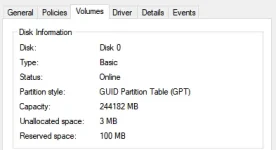
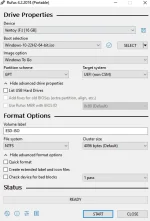
installing the iso using rufus
sa concern naman po na hindi tumatanggap ng os yung ssd
di ko na po alam dito, experience ko lang po dito ay yung os hindi tumatanggap ng ssd
- story: tried to install linux distro sa nvme pcie m.2 ssd, recognized sa bios pero yung distro hindi, pero pwede i-install sa 2.5 sata ssd
recommendations/suggestions/summary:
win + r
msinfo32
to check the partition of hdd/ssd (optional - kasi ung tool na gagamitin, format naman niya yung flash drive at pwede mamili ng partition scheme)
win + x
disk management
right click ung disk na gagamitin > properties > volumes
installing the iso using rufus
- select your windows iso, and choose windows to go
- partition scheme depende sayo/sa system mo
sa concern naman po na hindi tumatanggap ng os yung ssd
di ko na po alam dito, experience ko lang po dito ay yung os hindi tumatanggap ng ssd
- story: tried to install linux distro sa nvme pcie m.2 ssd, recognized sa bios pero yung distro hindi, pero pwede i-install sa 2.5 sata ssd
recommendations/suggestions/summary:
- flash drive, more than 32gb or external ssd
- use rufus, windows to go
- gpt for uefi, mbr for legacy
Cavenditsu
Enthusiast
You do not have permission to view the full content of this post. Log in or register now. popaano naman yung isang FD pero maraming Os and laman. like win7 win8 w10 w11. i mean isang usb lang
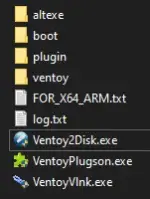 | 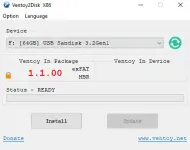 | 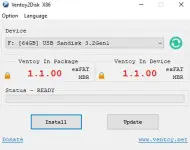 |
| run lang Ventoy2Disk.exe | before installing sa FD | after installing sa FD |

Ganyan na pangalan, tapos drag and drop na lang ng mga ISO sa loob.
(If hindi pa alam) Tapos boot to BIOS, change priority ng booting, dapat yung FD na may ventoy number 1.
Normal boot, then pili lang ng OS na i-install.
wow... merun na tutorial... salamat po....You do not have permission to view the full content of this post. Log in or register now. po
View attachment 3507312 View attachment 3507313 View attachment 3507315 run lang Ventoy2Disk.exe before installing sa FD after installing sa FD
View attachment 3507316
Ganyan na pangalan, tapos drag and drop na lang ng mga ISO sa loob.
(If hindi pa alam) Tapos boot to BIOS, change priority ng booting, dapat yung FD na may ventoy number 1.
Normal boot, then pili lang ng OS na i-install.
- Status
- Not open for further replies.
Similar threads
-
👨🏫 Tutorial SECRET: Make Windows 100% Invisible to Big Tech (Step-by-Step)
- Started by pinoyakogago
- Replies: 24
About this Thread
-
28Replies
-
2KViews
-
12Participants
Last reply from:
Rheiel
Rheiel
New Topics
-
Replace laptop lcd
- Started by toki07
- Replies: 0
- ❓ Computer Discussion & Support
-
Mga bossing patulong po nahäçk account ko due to carelessness
- Started by Jeii
- Replies: 2
- ❓ Computer Discussion & Support
-
Computer parts na cheap
- Started by bjenjay1
- Replies: 0
- ❓ Computer Discussion & Support
-
PC APPS - remote or auto saved type and auto audio
- Started by babyzero
- Replies: 0
- ❓ Computer Discussion & Support
-
Data Recovery May Chance pa bato
- Started by tambay28
- Replies: 0
- ❓ Computer Discussion & Support
-
Capcut PC pasabit po
- Started by L A Z A
- Replies: 0
- ❓ Computer Discussion & Support
-
Download Youtube Video using CMD
- Started by BeerGin69
- Replies: 1
- ❓ Computer Discussion & Support
-
Taiwebs alternative websites
- Started by gigsta
- Replies: 0
- ❓ Computer Discussion & Support
-
Tropic Colour - Sino meron nito?
- Started by mikehacker182
- Replies: 0
- ❓ Computer Discussion & Support
-
WINDOWS PRODUCT KEY
- Started by jhengky22
- Replies: 0
- ❓ Computer Discussion & Support
Trending Topics
Online now
- Members online
- 601
- Guests online
- 3,517
- Total visitors
- 4,118