 PH
PHSmartTubeNext
You do not have permission to view the full content of this post. Log in or register now.SmartTube is an advanced player for Android TVs and TV boxes, free & open source. You can play content from different public sources.
 Features: no ads ‧ SponsorBlock ‧ adjustable playback speed ‧ 8k support ‧ 60fps ‧ HDR ‧ read live chat ‧ customizable buttons ‧ no Google Services ‧ helpful international community
 Disadvantages: no support for phones and tablets, no comments stability, voice search and casting support might be worse than in the official apps, depending on your device; give it a try!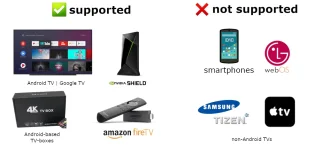
- (easiest) install You do not have permission to view the full content of this post. Log in or register now. on your Android TV, open it and enter kutt.it/stn_beta or kutt.it/stn_stable, then read, understand and confirm the security prompts. (You can also enter You do not have permission to view the full content of this post. Log in or register now. (for beta) or You do not have permission to view the full content of this post. Log in or register now. (for stable), but this requires an extra step to install the AFTVnews Downloader browser addon if you haven't already.)
- install a file transfer app on your Android TV, download the APK on your phone or computer and transfer it to your TV (e.g. You do not have permission to view the full content of this post. Log in or register now. from the Google Play Store / Amazon AppStore).
- Features
Adblocking
SmartTube does not show any ad banners, preroll ads or ad intermissions. It not just tries to prevent them, it is literally programmed to be completely unable to display any ads, so YouTube cannot slip anything in. This also means you cannot allow ads or whitelist channels. Some YouTube channels include sponsored messages in their videos, these can also be skipped, see You do not have permission to view the full content of this post. Log in or register now. below.SponsorBlock
SmartTube includes a SponsorBlock integration. From the You do not have permission to view the full content of this post. Log in or register now.:You can select which categories you want to skip in the settings. Unlike the browser addon, in SmartTube you cannot submit new segments (TVs and TV remotes aren't great devices for such precise operations). Note that SponsorBlock is a free and voluntary project based on user submissions, so don't expect it to 100% work every time. Sometimes, sponsor segments are not yet submitted to the database, sometimes the SponsorBlock servers are offline/overloaded.SponsorBlock is an open-source crowdsourced browser extension and open API for skipping sponsor segments in YouTube videos. [...] the extension automatically skips sponsors it knows about using a privacy preserving query system. It also supports skipping other categories, such as intros, outros and reminders to subscribe [and non-music parts in music videos].
Casting
To cast videos from your phone (or other devices), you must link that device to your TV. Unlike the original YouTube app, SmartTube does not automatically show up when you are in the same wifi network. How to link your smartphone and TV:- open SmartTube and go to settings
- go to "Remote control" (2nd option)
- open your YouTube app on your phone, go to settings > General > watch on TV
- click on connect using TV-code and enter the code from your TV
Due to technical limitations, you need to open the app on the TV before casting; SmartTube cannot automatically wake up the TV.