 PH
PHpadz23 you are most welcome.Thanks for sharing....
-
Welcome to PHCorner Forums! Sign up for free to unlock full access and exclusive privileges, including:
- Asking questions about computer and mobile issues
- Discovering internet tips for your mobile network and computer
You are using an out of date browser. It may not display this or other websites correctly.
You should upgrade or use an alternative browser.
You should upgrade or use an alternative browser.
🔒 Closed Queencee vpn v7 quantum
- Thread starter queencee
- Start date
- Status
- Not open for further replies.
alphajcpanda1Di ko maintindihan..wala po ba expired ito? Sana po mi mag pansin sakin. Ty
Gamit ka po sun, globe or tm sim para zero load at no expiry. Kasi po sa tnt need niyo pa magregister sa ngayon.
Now you need to know how to set up and use a vpn.
all you need to know is on page 1 sir. instructions,handler settings for sim in use. download links included.
https://phcorner.org/t/queencee-vpn-v7-quantum.185779/
steps:
1.read the thread and download queencee vpn v7 quantum
2.install the vpn apk file from the file folder.
3.launch queencee vpn. make sure you input the correct handler settings for the sim in use.
4.turn mobile data on.once you turn it on,a choice between "tunnel whole device" and "browser only" will appear. click "tunnel whole device".
if the proceedures were done correctly,you will see a key icon beside the status icon on the top left.
this means you are connected successfully.the app itself has indicators to let the user know its connection status.
5.set your region/server to india for a no capping connection.
alphajcpanda1
Established
Ano po pala ung other setting sa tm? San ko po yn ilalagay, pa help po..
Connecting lang po sya. Pa help po ate huhu
Connecting lang po sya. Pa help po ate
huhualphajcpanda1Ano po pala ung other setting sa tm? San ko po yn ilalagay, pa help po..
Connecting lang po sya. Pa help po ate
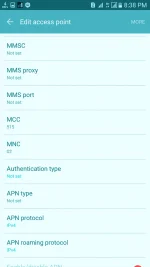
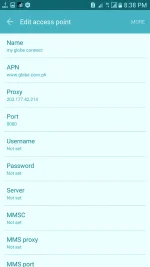
You are a globe / tm sim user, ok...have you made an apn mgc on your phone settings before proceeding to the vpn app? if not, please do this first :
•mgc apn phone setting
create apn mgc on your phone.
you may follow these steps...
1. settings
2. more
3. mobile network
4. access point name
5. choose globe telecom
6.choosemyglobeconnect
7. name:myglobeconnect
8.apn:You do not have permission to view the full content of this post. Log in or register now.
9. proxy: 203.177.42.214 or 108.67.222.222
10. port 8080


-do all of these on your cellphone's settings
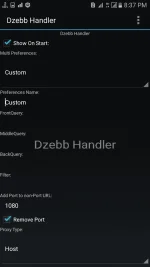
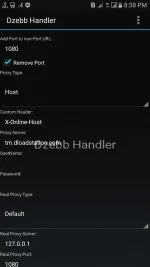
and now let us proceed to queencee vpn v7 quantum. click on the more settings
·more settings
connect trough an http proxy: check
use the following settings: check
hostcaddress:203.177.42.214
port: 8080

-input the correct globe/tm handlersettings
-hit mobile data "on"
: if you can see the connected icon status and the key on top, those are the indications that you are successfully connected to the internet using the vpn via mgc.
On Page 1, there is alist of Proxy Servers for Globe/TM.Mix match them with the real proxy servers. There will be a right combination for your location.
Always set your server/region to India for a no capping connection.
alphajcpanda1
Established
Ate di ko po makita yang more settingalphajcpanda1
You are a globe / tm sim user, ok...have you made an apn mgc on your phone settings before proceeding to the vpn app? if not, please do this first :
•mgc apn phone setting
create apn mgc on your phone.
you may follow these steps...
1. settings
2. more
3. mobile network
4. access point name
5. choose globe telecom
6.choosemyglobeconnect
7. name:myglobeconnect
8.apn:You do not have permission to view the full content of this post. Log in or register now.
9. proxy: 203.177.42.214 or 108.67.222.222
10. port 8080
-do all of these on your cellphone's settings
and now let us proceed to queencee vpn v7 quantum. click on the more settings
·more settings
connect trough an http proxy: check
use the following settings: check
hostcaddress:203.177.42.214
port: 8080
-input the correct globe/tm handlersettings
-hit mobile data "on"
: if you can see the connected icon status and the key on top, those are the indications that you are successfully connected to the internet using the vpn via mgc.
On Page 1, there is alist of Proxy Servers for Globe/TM.Mix match them with the real proxy servers. There will be a right combination for your location.
Always set your server/region to India for a no capping connection.
:banghead:2 sliding drawer ng po nasa 1st pageAte di ko po makita yang more setting
Sa kaliwa ng screen mo sa dulong dulo i tap mo or i slide mo pakanan lalabas na more setting tagalog na po yan sana basasa din pag me time tutuklawin ka nalang hindi yung susubo nalang sayo :banghead:
alphajcpanda1
Established
Baebie-Seol
Elite
Queencee ok npo ulit haha signal problem lang pala ung na eexp. Ko .. thank for this apk nla i can watch us tv in my phone without buffering hahahaha
alphajcpanda1
Established
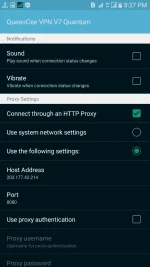

Gamitin po ninyo sa proxy server ang m.globe.com.phAte di padin connect. Eto po settings ko
Eto pa po
alphajcpanda1
Established
Eto po ung sa main na sinasabi
S
Sorry po talaga teh if di maka gets. Pasensya
S
SA handler setting po?Gamitin po ninyo sa proxy server ang m.globe.com.ph
Sorry po talaga teh if di maka gets. Pasensya
Attachments
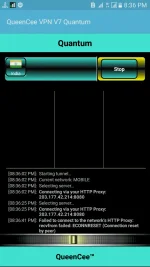
Sa handler po gamitin ninyo m.globe.com.ph working proxy serveryan sa mgc ginawa po ba ninyo?Eto po ung sa main na sinasabi
S
SA handler setting po?
Sorry po talaga teh if di maka gets. Pasensya
alphajcpanda1
Established
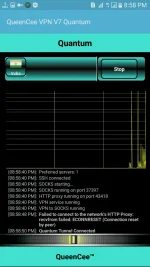
Ate. Salamat po.. Gumana na sya.. Pero 15kb/s ang pinaka mabilis.
 MGC lang po yan mabagal yan lalu na madaming nagamit sa area ninyo kasi free?
Yang ang prove na gumana lahit zero load
Dahil free means magtiis sa bibigay na speed pasalamat nalang ke sistah at me free net ka or mag load ka kung speed gusto mo:banghead::artist:
alphajcpanda1
Established
Hala galit.. Ahy ganun po ba.. Hihi sorry. Kung mi load po?kht konting mb lang? Ma susuply nya rin po ba?
Sorry po ah. Hihi... Salamat po maraming marami...
Sorry po ah. Hihi... Salamat po maraming marami...
Hala galit.. Ahy ganun po ba.. Hihi sorry. Kung mi load po?kht konting mb lang? Ma susuply nya rin po ba?
Sorry po ah. Hihi... Salamat po maraming marami...
 Nakita ka po ang dami mo pong demand ni dapat mapagana? Dun palang po dapat alam mo na?
 Well its up po sa inyo kung pag baleng balengtuning ninyo nasa inyo parin kasi ang buod neto free net para sa inyo tulong na wag demanding masyado kakahiya
alphajcpanda1
Established
Sorry po.. Thank you so much. Hihi.. Wag na po init ulo
Well its up po sa inyo kung pag baleng balengtuning ninyo nasa inyo parin kasi ang buod neto free net para sa inyo tulong na wag demanding masyado kakahiya
 ics:
ics:Sorry po.. Thank you so much. Hihi.. Wag na po init ulo
 No need po mag sorry wala pong galit dito
Ang moto po dito mag tulungan sa nakatulong po ako sa inyo
Credits po yan ke sistah queencee kung di sa kanya mga tut niya wala po tayong ganito cheer up enjoy freenet

- Status
- Not open for further replies.
Similar threads
-
👨🏫 Tutorial Quantum Computing & Machine Learning Build with Qiskit
- Started by WSODownload
- Replies: 0
-
Neutral Atom Quantum Computing 100 Hands-On Labs
- Started by CoursesToday
- Replies: 0
-
Quantum Metrology With Nv Centers 100 Hands-On Labs
- Started by CoursesToday
- Replies: 0
-
-
Post-Quantum Cryptography Hybrid TLS 1.3 | 100 Labs
- Started by CoursesToday
- Replies: 0
About this Thread
-
2KReplies
-
164KViews
-
825Participants
Last reply from:
raigab
raigab
New Topics
-
LOOKING FOR WIREGUARD SETUP IN MIKROTIK (WILLING TO PAY )
- Started by moreinformation
- Replies: 2
- 🚀 Freenet & Tunneling
-
MGa BOSS FREE VPN NA MAY PH SERVER PARA DITO SA AFRICA?
- Started by Junbiel 26
- Replies: 0
- 🚀 Freenet & Tunneling
-
PISOWIFI NO HULOG | (26-09-30) | NPV TUNNEL
- Started by Calcifeer
- Replies: 8
- 🚀 Freenet & Tunneling
-
[NOW WORKING] Youtube No Ads & Other Sites! via DNS
- Started by Lerps
- Replies: 31
- 🚀 Freenet & Tunneling
-
Free vpn can bypass captive portal
- Started by Darz2468
- Replies: 6
- 🚀 Freenet & Tunneling
-
Ano po gagawin pag ganto po?
- Started by jokejoke
- Replies: 3
- 🚀 Freenet & Tunneling
-
C pasabit pls need lang po sa edting
- Started by racetrack21
- Replies: 0
- 🚀 Freenet & Tunneling
Trending Topics
-
-
-
WIFI häçk using NodeMCU V3 ESP8266 Deauther + Evil Twin Attack (low badget 200 pesos)
- PHC H3XGAMING
Replies: 575 -
-
Multi-hop VLESS + Cloudflare WARP config (XHTTP + REALITY + TLS), privacy-focused
- Noahclanman
Replies: 4 -
-
Online now
- Members online
- 1,055
- Guests online
- 7,758
- Total visitors
- 8,813