 PH
PH-
Welcome to PHCorner Forums! Sign up for free to unlock full access and exclusive privileges, including:
- Asking questions about computer and mobile issues
- Discovering internet tips for your mobile network and computer
You are using an out of date browser. It may not display this or other websites correctly.
You should upgrade or use an alternative browser.
You should upgrade or use an alternative browser.
🔒 Closed Queencee vpn v7 quantum
- Thread starter queencee
- Start date
- Status
- Not open for further replies.
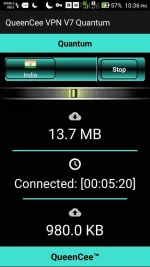
meowchiro13
Journeyman
good evening mam! sorry late ang feedback ko.
anyway, nakapagconnect ako pero sa isang server lang. matagal ma-disconnect unlike nung sa v6 (na isang server/country lang din nakakapagconnect)
i'm thankful dahil nakakapagbrowse ako, gusto ko sana ma-try yung sa india para makapagdl ako ng movie(wala kasing tv dito) kaso di ko naman alam mga combi-combination na yan.
sensya na po baka masabihan akong spoonfeed.
more power and salamat ulit sa pagshare mam!
good evening mam! sorry late ang feedback ko.
anyway, nakapagconnect ako pero sa isang server lang. matagal ma-disconnect unlike nung sa v6 (na isang server/country lang din nakakapagconnect)
i'm thankful dahil nakakapagbrowse ako, gusto ko sana ma-try yung sa india para makapagdl ako ng movie(wala kasing tv dito) kaso di ko naman alam mga combi-combination na yan.
sensya na po baka masabihan akong spoonfeed.
more power and salamat ulit sa pagshare mam!
anyway, nakapagconnect ako pero sa isang server lang. matagal ma-disconnect unlike nung sa v6 (na isang server/country lang din nakakapagconnect)
i'm thankful dahil nakakapagbrowse ako, gusto ko sana ma-try yung sa india para makapagdl ako ng movie(wala kasing tv dito) kaso di ko naman alam mga combi-combination na yan.
sensya na po baka masabihan akong spoonfeed.
more power and salamat ulit sa pagshare mam!
good evening mam! sorry late ang feedback ko.
anyway, nakapagconnect ako pero sa isang server lang. matagal ma-disconnect unlike nung sa v6 (na isang server/country lang din nakakapagconnect)
i'm thankful dahil nakakapagbrowse ako, gusto ko sana ma-try yung sa india para makapagdl ako ng movie(wala kasing tv dito) kaso di ko naman alam mga combi-combination na yan.
sensya na po baka masabihan akong spoonfeed.
more power and salamat ulit sa pagshare mam!
dAmzky you are welcome, good luck sir...thank you for the response maam..
Sleepy-Ash_Kuro you are most welcome and goodluck sir.Miss Queencee.. thanks po dito ...i try ko po ito. first time ko gumamit ng app mo. salamat idol
meowchiro13 Pleasant day ma'am. You can do it too, only ths time it is more of a Power House, just click on the spoiler "BOOST Handler Settings for TNT".Copy and paste the details needed, then set the region/server to India by clicking "Start". Once you are connected, it will be there as in fixed, no need to mix match because you are already on BOOST. If that one set of Proxy Server does not respond to your location, just copy paste another set to your QueenCee VPN V7 Quantum Handler Settings.good evening mam! sorry late ang feedback ko.
anyway, nakapagconnect ako pero sa isang server lang. matagal ma-disconnect unlike nung sa v6 (na isang server/country lang din nakakapagconnect)
i'm thankful dahil nakakapagbrowse ako, gusto ko sana ma-try yung sa india para makapagdl ako ng môviê(wala kasing tv dito) kaso di ko naman alam mga combi-combination na yan.
sensya na po baka masabihan akong spoonfeed.
more power and salamat ulit sa pagshare mam!
good evening mam! sorry late ang feedback ko.
anyway, nakapagconnect ako pero sa isang server lang. matagal ma-disconnect unlike nung sa v6 (na isang server/country lang din nakakapagconnect)
i'm thankful dahil nakakapagbrowse ako, gusto ko sana ma-try yung sa india para makapagdl ako ng môviê(wala kasing tv dito) kaso di ko naman alam mga combi-combination na yan.
sensya na po baka masabihan akong spoonfeed.
more power and salamat ulit sa pagshare mam!
Good luck!
reececasey You are most welcome and thank you for the screenshot and the positive feedback sir.thanks m'queencee... sun user... iloveu... haha...
giba_7 Are you using MGC now sirgood day madam queencee globe po gamit ko now di po pumapalo kht 1mb unlike tnt b4 kaya 5mb..may i aadd pa po ba aq? queencee v7 po gamit ko..thanks madam nice app!
mgc ung inedit po mam sa acces point? newbie po mam cnxa...giba_7 Are you using MGC now sir
giba_7 Expect a low capacity rate on any VPN when you are connected via MGC. You can have a faster Globe experience when you are on default but it is not always available. This is why we use MGC as an alternative way to connect.mgc ung inedit po mam sa acces point? newbie po mam cnxa...
You are a globe / tm sim user, ok...have you made an apn mgc on your phone settings before proceeding to the vpn app? if not, please do this first :
•mgc apn phone setting
create apn mgc on your phone.
you may follow these steps...
1. settings
2. more
3. mobile network
4. access point name
5. choose globe telecom
6.choosemyglobeconnect
7. name:myglobeconnect
8.apn:You do not have permission to view the full content of this post. Log in or register now.
9. proxy: 203.177.42.214 or 108.67.222.222
10. port 8080
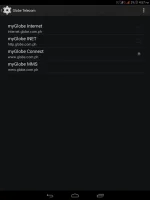
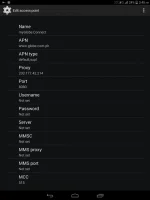
-do all of these on your cellphone's settings
and now let us proceed to queencee vpn v7quantum. click on the more settings
·more settings
connect trough an http proxy: check
use the following settings: check
hostaddress:203.177.42.214
port: 8080
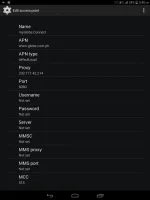
-input the correct globe/tm handler settings(See Page 1 for the guide and yes chooseproxy server and real proxy server, type themin)
-hit mobile data "on"
: if you can see theconnected icon status and the key on top, those are the indications that you are successfully connected totheinternet using the vpn via mgc.
On Page 1, there is a list of Proxy Servers forGlobe/TM.Mix match them with the real proxy servers. There will be a right combination for your location.
Always set your server/region to India for a no capping connection.
spikey FROG
Fanatic
loud and clear.. thanks
gaitanjerry
Grasshopper
Try ko po maam, advance thanks!
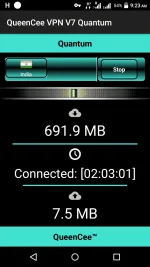

yuji012maan bat ayaw sakin need load ba sya ? tnt user
Now that we don't have a working proxy server (no load) for TNT. I'd suggest that you use a regular Sun sim network. It will work on zero load and it has BOOST Handler Settings now... See it on page 1, on the spoilers(You will see it when you are an established member).
Or...
Use Globe and TM sim networks- See Page 1.
For TNT, as soon as I find a working proxy server, I'll update.
Some opted to use TNT with load and registered to a promo.
How to Register:
Just text COC10 to 4545
Amount: P10.00
Validity: 3 days
Use m.google.com.ph as your Proxy Server on our VPN.
How to Register:
Just text WATTPAD to 4545
Amount: P10.00
Validity: 3 days
Use m.google.com.ph as your Proxy Server on our VPN.
How to Register:
Just text VIBER10 to 4545
Amount: P10.00
Validity: 3 days
Use tntviber.com as your Proxy Server on our VPN.
Always set your Region/Server to India for a no capping connection.
kutipot you are most welcome.loud and clear.. thanks
gaitanjerry you are most welcome and goodluck.Try ko po maam, advance thanks!
Sync00 Thank you for the positive feedback.I really Love queencee I mean Queencee VPN. Hehe
Enjoying online streaming with QueenCee VPN V7 Quantum si sir... So nice!
yuji012 read ka lang konti pataas sir, I posted a tutorial for MGC on this same page.thanks maam
working sa mgc to maam?

- Status
- Not open for further replies.
Similar threads
-
👨🏫 Tutorial Quantum Computing & Machine Learning Build with Qiskit
- Started by WSODownload
- Replies: 0
-
Neutral Atom Quantum Computing 100 Hands-On Labs
- Started by CoursesToday
- Replies: 0
-
Quantum Metrology With Nv Centers 100 Hands-On Labs
- Started by CoursesToday
- Replies: 0
-
-
Post-Quantum Cryptography Hybrid TLS 1.3 | 100 Labs
- Started by CoursesToday
- Replies: 0
About this Thread
-
2KReplies
-
164KViews
-
825Participants
Last reply from:
raigab
raigab
New Topics
-
LOOKING FOR WIREGUARD SETUP IN MIKROTIK (WILLING TO PAY )
- Started by moreinformation
- Replies: 2
- 🚀 Freenet & Tunneling
-
MGa BOSS FREE VPN NA MAY PH SERVER PARA DITO SA AFRICA?
- Started by Junbiel 26
- Replies: 0
- 🚀 Freenet & Tunneling
-
PISOWIFI NO HULOG | (26-09-30) | NPV TUNNEL
- Started by Calcifeer
- Replies: 8
- 🚀 Freenet & Tunneling
-
[NOW WORKING] Youtube No Ads & Other Sites! via DNS
- Started by Lerps
- Replies: 31
- 🚀 Freenet & Tunneling
-
Free vpn can bypass captive portal
- Started by Darz2468
- Replies: 6
- 🚀 Freenet & Tunneling
-
Ano po gagawin pag ganto po?
- Started by jokejoke
- Replies: 3
- 🚀 Freenet & Tunneling
-
C pasabit pls need lang po sa edting
- Started by racetrack21
- Replies: 0
- 🚀 Freenet & Tunneling
Trending Topics
-
-
-
WIFI häçk using NodeMCU V3 ESP8266 Deauther + Evil Twin Attack (low badget 200 pesos)
- PHC H3XGAMING
Replies: 575 -
-
Multi-hop VLESS + Cloudflare WARP config (XHTTP + REALITY + TLS), privacy-focused
- Noahclanman
Replies: 4 -
-
Online now
- Members online
- 1,111
- Guests online
- 7,170
- Total visitors
- 8,281