PH
PHphcodesage
Established
Needed Apps: 3utools for ios driver,
Palera1n Windows App: attachment
How to use Palera1n Windows
Installing Palera1n Windows 1.1 on your PC is a hassle-free process, demanding no intricate preparations on the user's part. The sole prerequisite is to have a Windows 64-bit system running on Intel, AMD, or Arm processors, along with the installation of Apple Mobile Device Support directly from Apple servers (avoiding the Windows Store version). This versatile tool extends its support from iOS 15 all the way up to the latest iOS 16.6.To install Palera1n Windows 1.1, follow those steps:
- Navigate to Palera1n Windows at link on the top of this page.
- Click on the green download button and select Download as ZIP.
- Unzip Palera1n_1.1.zip to Desktop.
- Install the AppleMobileDeviceSupport64.msi.
- Restart your Windows PC after completed.
- Open Palera1n.exe.
- Connect your iPhone to PC via USB.
- Disable Find My iPhone in Settings app.
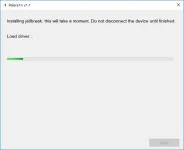
- Press on Start and follow on screen instructions to You do not have permission to view the full content of this post. Log in or register now..
- Click on jailbreak to boot PongoOS.
- Follow the onscreen instruction to jailbreak.