❓ Help Flowchart problem

Hello! Don't worry, I'll be happy to help you with creating a flowchart and solving any problem you have. Could you please provide me with more details about the problem you're trying to solve?
 
I apologize for any confusion. In order to help you, I would need more specific information about what you would like me to explain. Are you referring to the concept of a flowchart in general? Or do you have a specific flowchart or problem that you would like assistance with? Please provide some more details so that I can better understand how to assist you.
 
I apologize for any confusion. In order to help you, I would need more specific information about what you would like me to explain. Are you referring to the concept of a flowchart in general? Or do you have a specific flowchart or problem that you would like assistance with? Please provide some more details so that I can better understand how to assist you.
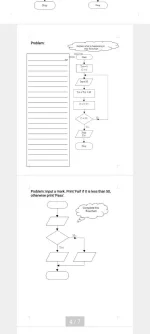
Explain what is happening in this flowchart

Start

Tot=0
C=0

Input M

Tot=Tot + M

C=C + 1

C=10

Print
Tot

Stop
 
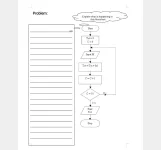
Explain what is happening in this flowchart

Start

Tot=0
C=0

Input M

Tot=Tot + M

C=C + 1

C=10

Print
Tot

Stop
Certainly! This flowchart represents a simple problem that involves taking user input and performing calculations. Here's a breakdown of the steps:

1. Start: The flowchart begins here.

2. Tot=0 and C=0: Two variables, "Tot" and "C", are initialized to 0. These variables will be used for storing the total and keeping count.

3. Input M: The user is prompted to input a value for M. This value will be stored in the variable M.

4. Tot=Tot + M: The value of M is added to the current value of Tot. This calculation updates the value of Tot.

5. C=C + 1: The value of C is incremented by 1. This is done to keep track of the number of times the loop has executed.

6. C=10: The flowchart checks if the value of C is equal to 10. If it is, the flow continues to the next step. If not, the flow returns to the "Input M" step.

7. Print Tot: The total value, stored in the variable Tot, is printed.

8. Stop: The flowchart ends here.

In summary, this flowchart repeatedly takes user input, adds it to a running total, increments a counter, and stops after the counter reaches 10. The final total is then printed.
 

Similar threads

About this Thread

  • 5
    Replies
  • 323
    Views
  • 1
    Participants
Last reply from:
Unknown user

Trending Topics

Online now

Members online
982
Guests online
19,726
Total visitors
20,708

Forum statistics

Threads
2,289,419
Posts
29,058,448
Members
1,213,765
Latest member
bedrijo
Back
Top