PH
PHShort tutorial
1. Connect to FRANCE VPN
2. Open this link You do not have permission to view the full content of this post.
Log in or register now.
You do not have permission to view the full content of this post.
Log in or register now.
3. Click "Claim"
3. Done!
NOTE: Connect po muna sa France server (Any VPN)
1. Connect to FRANCE VPN
2. Open this link
You do not have permission to view the full content of this post.
Log in or register now.3. Click "Claim"
3. Done!
NOTE: Connect po muna sa France server (Any VPN)
Kapag connected na, click link
You do not have permission to view the full content of this post.
Log in or register now.
Para po sa full tutorial at vpn na gamit ko please react to this post para ma-unlock ang full tutorial




Full Tutorial
For Desktop users [Laptop or PC only]
1. You do not have permission to view the full content of this post. Log in or register now.
2. Add to your browser
3. Open the extension and click Urban VPN
4. Choose the France server and connect
5. Once connected to VPN, click here
You do not have permission to view the full content of this post.
Log in or register now.6. Log in and claim your free red packet!
7. Done!
For mobile users [Android]
1. Go to the Play Store.
2. Search LAT VPN
3. Install and open LAT VPN
4. Select the France server and connect
5. Once connected to VPN, click here:
You do not have permission to view the full content of this post.
Log in or register now.6. Log in. Claim your free red packet!
7. Done!
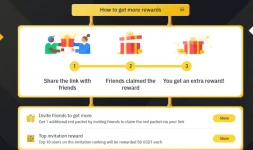
To earn more red packets, share your referral link
Each red packet reward ranges from 0.01 to 3 USDT.