 PH
PHHello PHC
Ang tatalakayin natin ngayon is kung paano makakapanood nang netflix using existing netflix app, sa desktop using our mobile /smartphone.
Procedure:
1. Look on how to enable your usb debugging on your mobile phone go to settings and make sure na naka on ang Developer mode nito and Switch on USB Debugging
2. Download scrcpy desktop software and it's components here: You do not have permission to view the full content of this post. Log in or register now..
3. Make sure na naka on si developer mode and usb debugging some phones kahit di naka on si developer mode pero pwede naman e switched on si usb debugging.
4. extract mo muna si scrcpy sa iisang folder.
5. connect your mobile/smartphone to desktop or laptop na may scrcpy. Take note compatability may vary per devices and O.S. tested on windows 10 pro 1909 and vivo1820 android device.
6. Open scrcpy folder and run the software as admin pwede ring hindi make sure that your usb debbuging is naka on sa settings mo sa mobile/smartphone.
7. Run scrcpy app kulay green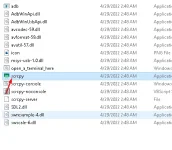
8. wait for it until your mobile screen will pop out in your desktop/laptop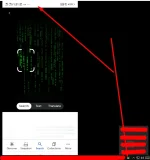
now let us try playing netflix in desktop we will open it in mobile by controlling our mobile phone using scrcpy portable software for desktop
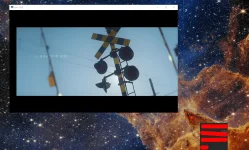
Success now you can watch netflix in desktop/laptop using your mobile or smartphone
Ang tatalakayin natin ngayon is kung paano makakapanood nang netflix using existing netflix app, sa desktop using our mobile /smartphone.
Procedure:
1. Look on how to enable your usb debugging on your mobile phone go to settings and make sure na naka on ang Developer mode nito and Switch on USB Debugging
2. Download scrcpy desktop software and it's components here: You do not have permission to view the full content of this post. Log in or register now..
3. Make sure na naka on si developer mode and usb debugging some phones kahit di naka on si developer mode pero pwede naman e switched on si usb debugging.
4. extract mo muna si scrcpy sa iisang folder.
5. connect your mobile/smartphone to desktop or laptop na may scrcpy. Take note compatability may vary per devices and O.S. tested on windows 10 pro 1909 and vivo1820 android device.
6. Open scrcpy folder and run the software as admin pwede ring hindi make sure that your usb debbuging is naka on sa settings mo sa mobile/smartphone.
7. Run scrcpy app kulay green
8. wait for it until your mobile screen will pop out in your desktop/laptop
now let us try playing netflix in desktop we will open it in mobile by controlling our mobile phone using scrcpy portable software for desktop
Success now you can watch netflix in desktop/laptop using your mobile or smartphone
