 PH
PH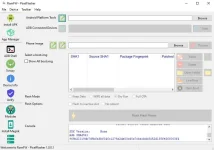
Features of PixelFlasher:
Simple and easy-to-use interfaceAbility to flash boot images, custom ROMs, and other images
Ability to ρá†ch boot images with Magisk
Ability to manage Magisk modules
Ability to erase and backup partitions
Ability to lock and unlock bootloader
Ability to gain temporary root access
And many more...
PixelFlasher is a powerful and versatile tool for managing and customizing Pixel devices. It is a great option for both beginners and experienced users alike.
What's new
- Added Wipe option (only available in a custom flashing), this will wipe user data after flashing, required for first-time vbmeta verification disabling.
- Added validation checks to make sure A and B slot vbmeta verify / verification states match.
- Added a warning when toggling Disable Verification to inform about the potential wipe implications.
- Display both slot's verity / verification states when displaying device details.
- Extract vbmeta.img if found to easily select it for patching.
- Improved paste button which now dynamically selects what to paste based on the custom flash option selection.
How To Use?
- Download and install ROMFW PixelFlasher on your computer.
- Connect your Pixel device to your computer using a USB cable.
- Open PixelFlasher and select the mode you want to use (normal or advanced).
- Select the operation you want to perform (flash boot image, flash custom ROM, ρá†ch boot image, manage Magisk modules, etc.).
- Follow the instructions on the screen to complete the operation.
https://mobiletodayfrp.phc.onl/#forbidden#/2023/10/romfw-pixelflasher-tool-2023-working.html