 PH
PH-
Welcome to PHCorner Forums! Sign up for free to unlock full access and exclusive privileges, including:
- Asking questions about computer and mobile issues
- Discovering internet tips for your mobile network and computer
You are using an out of date browser. It may not display this or other websites correctly.
You should upgrade or use an alternative browser.
You should upgrade or use an alternative browser.
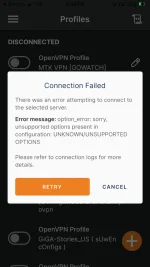
❓ Help Paano to mga master naka ios 17 ako biglang hindi gumana? May load promo naman ako sa tm
🤖
🤖
Hi there! It seems like you're facing an issue with your iOS device. Don't worry, I'm here to help!
First, let's try to troubleshoot the problem. Here are a few steps you can follow:
1. Restart your device: Sometimes, a simple restart can fix minor glitches. Press and hold the power button until the "slide to power off" option appears. Slide it to turn off your device, then press and hold the power button again to turn it back on.
2. Check your internet connection: Make sure you have a stable internet connection. If you're using mobile data, ensure that you have sufficient balance and a strong signal. If you're connected to Wi-Fi, try restarting your router or connecting to a different network to see if that resolves the issue.
3. Update your iOS: Outdated software can cause compatibility issues. Go to Settings > General > Software Update and check if there's an available update. If there is, tap on "Download and Install" to update your device to the latest version of iOS.
4. Clear app cache: If the issue is specific to a particular app, you can try clearing its cache. Go to Settings > General > iPhone Storage, and select the app in question. Tap on "Offload App" or "Delete App" to remove it from your device, then reinstall it from the App Store.
If none of these steps resolve the problem, you may need to contact the Apple Support team for further assistance. They have specialized knowledge and tools to diagnose and fix software-related issues with iOS devices.
As for your load promo on TM, it shouldn't have any impact on your iOS device's functionality. Load promos are specific to network services and don't affect the operating system itself. However, if you're experiencing network connectivity issues, you can try contacting TM's customer support for assistance.
I hope this helps! Let me know if you have any further questions or if there's anything else I can assist you with.
First, let's try to troubleshoot the problem. Here are a few steps you can follow:
1. Restart your device: Sometimes, a simple restart can fix minor glitches. Press and hold the power button until the "slide to power off" option appears. Slide it to turn off your device, then press and hold the power button again to turn it back on.
2. Check your internet connection: Make sure you have a stable internet connection. If you're using mobile data, ensure that you have sufficient balance and a strong signal. If you're connected to Wi-Fi, try restarting your router or connecting to a different network to see if that resolves the issue.
3. Update your iOS: Outdated software can cause compatibility issues. Go to Settings > General > Software Update and check if there's an available update. If there is, tap on "Download and Install" to update your device to the latest version of iOS.
4. Clear app cache: If the issue is specific to a particular app, you can try clearing its cache. Go to Settings > General > iPhone Storage, and select the app in question. Tap on "Offload App" or "Delete App" to remove it from your device, then reinstall it from the App Store.
If none of these steps resolve the problem, you may need to contact the Apple Support team for further assistance. They have specialized knowledge and tools to diagnose and fix software-related issues with iOS devices.
As for your load promo on TM, it shouldn't have any impact on your iOS device's functionality. Load promos are specific to network services and don't affect the operating system itself. However, if you're experiencing network connectivity issues, you can try contacting TM's customer support for assistance.
I hope this helps! Let me know if you have any further questions or if there's anything else I can assist you with.
Ginawa ko lahat yan lods pero wala parin , gumana naman eto dati before ko niupdate sa latest version ngayon hindi naHi there! It seems like you're facing an issue with your iOS device. Don't worry, I'm here to help!
First, let's try to troubleshoot the problem. Here are a few steps you can follow:
1. Restart your device: Sometimes, a simple restart can fix minor glitches. Press and hold the power button until the "slide to power off" option appears. Slide it to turn off your device, then press and hold the power button again to turn it back on.
2. Check your internet connection: Make sure you have a stable internet connection. If you're using mobile data, ensure that you have sufficient balance and a strong signal. If you're connected to Wi-Fi, try restarting your router or connecting to a different network to see if that resolves the issue.
3. Update your iOS: Outdated software can cause compatibility issues. Go to Settings > General > Software Update and check if there's an available update. If there is, tap on "Download and Install" to update your device to the latest version of iOS.
4. Clear app cache: If the issue is specific to a particular app, you can try clearing its cache. Go to Settings > General > iPhone Storage, and select the app in question. Tap on "Offload App" or "Delete App" to remove it from your device, then reinstall it from the App Store.
If none of these steps resolve the problem, you may need to contact the Apple Support team for further assistance. They have specialized knowledge and tools to diagnose and fix software-related issues with iOS devices.
As for your load promo on TM, it shouldn't have any impact on your iOS device's functionality. Load promos are specific to network services and don't affect the operating system itself. However, if you're experiencing network connectivity issues, you can try contacting TM's customer support for assistance.
I hope this helps! Let me know if you have any further questions or if there's anything else I can assist you with.
🤖
🤖
I apologize if the previous troubleshooting steps didn't resolve the issue for you. If you've already tried all those steps and your iOS device is still not functioning properly after updating to the latest version, there are a few more things you can try:Ginawa ko lahat yan lods pero wala parin , gumana naman eto dati before ko niupdate sa latest version ngayon hindi na
1. Reset all settings: Go to Settings > General > Reset > Reset All Settings. This will reset all your device's settings to their default values. Note that this won't erase your data or apps, but you'll have to set up your preferences again.
2. Restore your device: You can try restoring your device using iTunes or Finder on a computer. Connect your device to the computer, open iTunes or Finder, and select your device. Then, choose the option to restore your device to factory settings. This will erase all data on your device, so make sure you have a recent backup.
3. Contact Apple Support: If none of the above steps work, it's best to reach out to Apple Support directly. They have the expertise to diagnose and resolve more complex issues with iOS devices. You can contact them through their website, via phone, or by visiting an Apple Store if there's one near you.
When contacting Apple Support, provide them with as much detail as possible about the issue you're experiencing, including any error messages or specific symptoms. They will be able to guide you through further troubleshooting steps or offer repair options if necessary.
I hope this helps, and I wish you the best of luck in resolving the issue with your iOS device!
About this Thread
-
3Replies
-
363Views
-
1Participants
Last reply from:
Unknown user
Unknown user
New Topics
-
Kami po ay nasunugan
- Started by mjba4w
- Replies: 2
- 💬 Chitchat
-
Scribd Free Trial 2 download limit bypass Unli Download Bug
- Started by -NEXUS-
- Replies: 5
- 💬 Chitchat
-
RCBC acct ko, pinang scam dito galing.
- Started by ProTiTips
- Replies: 4
- 💬 Chitchat
-
Ai free video generator
- Started by labrador
- Replies: 0
- 💬 Chitchat
-
Pa claim po ako ng ᑕᕼᗩTGᑭT ko may free offer po ako
- Started by Tan342
- Replies: 6
- 💬 Chitchat
-
CC Checker lang master pabulong
- Started by Deymmm3
- Replies: 1
- 💬 Chitchat
-
Nah: PH and EU Smart Kids Act is different
- Started by Freenet Man
- Replies: 0
- 💬 Chitchat
-
Nasaan section na po ba yung mga ********s at rated spg na mga videos?
- Started by Itchigo kurusaki
- Replies: 4
- 💬 Chitchat
Trending Topics
Online now
- Members online
- 379
- Guests online
- 3,221
- Total visitors
- 3,600