PH
PH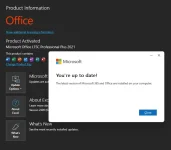
Manual Activation using Command Prompt
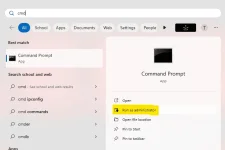
Step 1: Run Command Prompt app as administrator.Click on the start button, search for “cmd” then run it with admin rights.
Step 2: Navigate to your Office folder.
If you install your Office in the ProgramFiles folder, the path will be “%ProgramFiles%\Microsoft Office\Office16”
paste and enter the code below
Code:
cd /d %ProgramFiles%\Microsoft Office\Office16
Step 3: Convert your Office license to volume one if possible.
If your Office is got from Microsoft, this step is required. On the contrary, if you install Office from a Volume ISO file, this is optional so just skip it if you want.
paste and enter the code below
Code:
for /f %x in ('dir /b ..\root\Licenses16\ProPlus2021VL_KMS*.xrm-ms') do cscript ospp.vbs /inslic:"..\root\Licenses16\%x"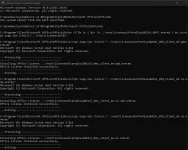
Step 4: Use KMS client key to activate your Office.
Make sure your PC is connected to the internet, then run the following command.
paste and enter the code below
Step 4.1
Code:
cscript ospp.vbs /setprt:1688
Code:
cscript ospp.vbs /unpkey:6F7TH >nul
Code:
cscript ospp.vbs /inpkey:FXYTK-NJJ8C-GB6DW-3DYQT-6F7TH
Code:
cscript ospp.vbs /sethst:e8.us.to
Code:
cscript ospp.vbs /act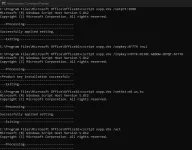
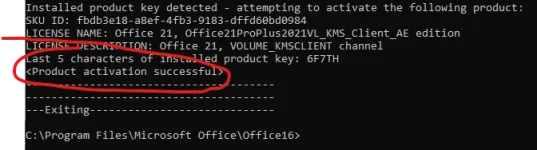
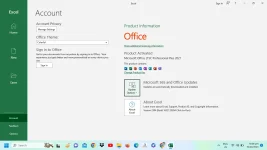
IF WORKING,
SEND YOUR SCREENSHOT !!! 
*If you see the error 0xC004F074, it means that your internet connection is unstable or the server is busy. Please make sure your device is online and try the command “act” again until you succeed.
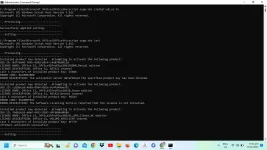
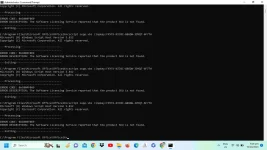
Here is all the text you will get in the command prompt window.
C:\Windows\system32>cd /d %ProgramFiles(x86)%\Microsoft Office\Office16The system cannot find the path specified.C:\Windows\system32>cd /d %ProgramFiles%\Microsoft Office\Office16C:\Program Files\Microsoft Office\Office16>for /f %x in ('dir /b ..\root\Licenses16\ProPlus2021VL_KMS*.xrm-ms') do cscript ospp.vbs /inslic:"..\root\Licenses16\%x"C:\Program Files\Microsoft Office\Office16>cscript ospp.vbs /inslic:"..\root\Licenses16\ProPlus2021VL_KMS_Client_AE-ppd.xrm-ms"Microsoft (R) Windows Script Host Version 5.812Copyright (C) Microsoft Corporation. All rights reserved.---Processing-----------------------------------------------------------------Installing Office license: ..\root\licenses16\proplus2021vl_kms_client_ae-ppd.xrm-msOffice license installed successfully.------------------------------------------Exiting-----------------------------C:\Program Files\Microsoft Office\Office16>cscript ospp.vbs /inslic:"..\root\Licenses16\ProPlus2021VL_KMS_Client_AE-ul-oob.xrm-ms"Microsoft (R) Windows Script Host Version 5.812Copyright (C) Microsoft Corporation. All rights reserved.---Processing-----------------------------------------------------------------Installing Office license: ..\root\licenses16\proplus2021vl_kms_client_ae-ul-oob.xrm-msOffice license installed successfully.------------------------------------------Exiting-----------------------------C:\Program Files\Microsoft Office\Office16>cscript ospp.vbs /inslic:"..\root\Licenses16\ProPlus2021VL_KMS_Client_AE-ul.xrm-ms"Microsoft (R) Windows Script Host Version 5.812Copyright (C) Microsoft Corporation. All rights reserved.---Processing-----------------------------------------------------------------Installing Office license: ..\root\licenses16\proplus2021vl_kms_client_ae-ul.xrm-msOffice license installed successfully.------------------------------------------Exiting-----------------------------C:\Program Files\Microsoft Office\Office16>cscript ospp.vbs /setprt:1688Microsoft (R) Windows Script Host Version 5.812Copyright (C) Microsoft Corporation. All rights reserved.---Processing-----------------------------------------------------------------Successfully applied setting.------------------------------------------Exiting-----------------------------C:\Program Files\Microsoft Office\Office16>cscript ospp.vbs /unpkey:6F7TH >nulC:\Program Files\Microsoft Office\Office16>cscript ospp.vbs /inpkey:FXYTK-NJJ8C-GB6DW-3DYQT-6F7THMicrosoft (R) Windows Script Host Version 5.812Copyright (C) Microsoft Corporation. All rights reserved.---Processing-----------------------------------------------------------------<Product key installation successful>------------------------------------------Exiting-----------------------------C:\Program Files\Microsoft Office\Office16>cscript ospp.vbs /sethst:e8.us.toMicrosoft (R) Windows Script Host Version 5.812Copyright (C) Microsoft Corporation. All rights reserved.---Processing-----------------------------------------------------------------Successfully applied setting.------------------------------------------Exiting-----------------------------C:\Program Files\Microsoft Office\Office16>cscript ospp.vbs /actMicrosoft (R) Windows Script Host Version 5.812Copyright (C) Microsoft Corporation. All rights reserved.---Processing-----------------------------------------------------------------Installed product key detected - attempting to activate the following product:SKU ID: cd18ecc0-466a-45d4-8d2e-8c4fa48ae591LICENSE NAME: Office 21, Office21ProPlus2021R_Grace editionLICENSE DESCRIPTION: Office 21, RETAIL(Grace) channelLast 5 characters of installed product key: PG343ERROR CODE: 0xC004F017ERROR DESCRIPTION: The Software Licensing Service reported that the license is not installed.---------------------------------------Installed product key detected - attempting to activate the following product:SKU ID: fbdb3e18-a8ef-4fb3-9183-dffd60bd0984LICENSE NAME: Office 21, Office21ProPlus2021VL_KMS_Client_AE editionLICENSE DESCRIPTION: Office 21, VOLUME_KMSCLIENT channelLast 5 characters of installed product key: 6F7TH<Product activation successful>---------------------------------------------------------------------------------Exiting-----------------------------C:\Program Files\Microsoft Office\Office16>
Microsoft Office 2021 Download Link direct from Microsoft Site
Download
ctto: msguides


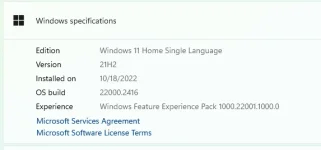
 pano kaya to?