PH
PH
E
eerie
Para to sa mga mahihina ang internet connection/signal sa Smart/TNT.. pero depende parin tlaga yan sa location pwedeng bumilis at pwedeng walang pagbabago pagkatapos nyo mag change band..
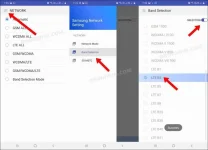
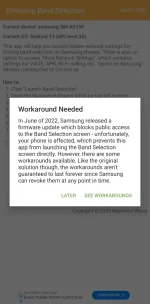
May mga tutorial na dito nyan matagal na mga 2015 pa.. dinagdagan ko na lang ng ilang info at ginawan ng video tutorial para mas madali ninyo magawa ang pagpalit ng band..
Samsung A51 Android 13 One UI version 5.1 ang gamit ko.. feedback na lang kung may pagbabago sa speed ng internet connection nyo..
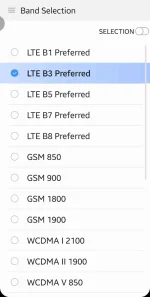
Pag sa LTE Only nagpapakita lang sakin yung LTE_CA sa Band 3, wala sa Band 1 at 28..
Pag sa Preferred naman kahit na aling band ang piliin ko may LTE_CA..
Bukod sa mas malakas ang LTE_CA keysa sa LTE kapag pinili mo yung Preferred pwede ka parin makapag text at call di katulad pag LTE Only hindi pwede..
View attachment Screen_Recording_20231013_143500_Phone.mp4
May mga tutorial na dito nyan matagal na mga 2015 pa.. dinagdagan ko na lang ng ilang info at ginawan ng video tutorial para mas madali ninyo magawa ang pagpalit ng band..
Samsung A51 Android 13 One UI version 5.1 ang gamit ko.. feedback na lang kung may pagbabago sa speed ng internet connection nyo..
Changing the default band on an Android device can offer several benefits, depending on the context. Here are a few potential advantages:
1. Improved Signal Strength: Switching to a different band might help if you're experiencing weak signal reception. Different bands operate at varying frequencies, and some may provide better coverage or penetration through obstacles like buildings or trees.
2. Faster Data Speeds: Certain bands support higher data transfer rates, so switching to a band with better capabilities could result in faster internet speeds when browsing, streaming, or downloading.
3. Reduced Network Congestion: In densely populated areas, some bands might be less crowded than others. By switching to a less congested band, you could experience improved call quality, smoother data usage, and reduced latency.
However, it's important to note that band availability and compatibility depend on your mobile network provider and device's specifications. Changing bands typically requires advanced knowledge, and without proper understanding, it could lead to connectivity issues or reduced overall performance.
If you're facing specific issues or would like more detailed guidance on changing bands for your specific device, please provide further details or consult your device's manufacturer or network provider.
LTE (Long-Term Evolution) and LTE_CA (LTE Carrier Aggregation) are both mobile network technologies used for data transmission in 4G networks. While they are related, there are some key differences between the two.
LTE is the basic technology used in 4G networks to provide high-speed data communication. It uses a single carrier frequency to transmit data from the network to the device and vice versa. LTE supports various data transfer rates, with peak download speeds reaching up to 300 Mbps.
LTE_CA, on the other hand, is an enhancement to LTE technology that allows for the simultaneous use of multiple carrier frequencies. Carrier aggregation combines different frequency bands, known as component carriers, to increase the overall bandwidth available for data transmission. This enables higher data transfer rates and improved network capacity. With LTE_CA, peak download speeds can reach up to 1 Gbps.
To summarize, LTE is the foundation technology for 4G networks, while LTE_CA is a specific feature within LTE that allows for carrier aggregation and increased data speeds. LTE_CA brings faster speeds and enhanced network performance by utilizing multiple carrier frequencies simultaneously.
Pag sa LTE Only nagpapakita lang sakin yung LTE_CA sa Band 3, wala sa Band 1 at 28..
Pag sa Preferred naman kahit na aling band ang piliin ko may LTE_CA..
Bukod sa mas malakas ang LTE_CA keysa sa LTE kapag pinili mo yung Preferred pwede ka parin makapag text at call di katulad pag LTE Only hindi pwede..
View attachment Screen_Recording_20231013_143500_Phone.mp4