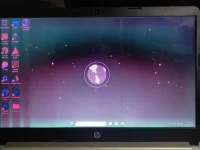
Based on the symptoms mentioned in the topic, it is likely that this is a hardware issue rather than a software problem. The pink and green colors on the screen usually indicate a problem with the display or graphics card.
To confirm whether it is a hardware issue, you can try the following steps:
1. Connect an external monitor to your laptop. If the external monitor displays colors correctly, then it is likely that the issue is with your laptop's display or graphics card.
2. Update your graphics card driver. Sometimes, outdated or corrupt drivers can cause display issues. Visit the manufacturer's website and download the latest driver for your graphics card.
3. Perform a hard reset. Turn off your laptop, disconnect the power cord, remove the battery (if possible), and hold down the power button for about 15 seconds. This will help discharge any residual power and reset the hardware.
If the issue persists after trying these steps, it is advisable to contact a professional technician or the manufacturer's support for further assistance. They will be able to diagnose the problem accurately and provide the best solution, which may involve repairing or replacing the faulty hardware component.
 PH
PH