Hi! I understand that you're experiencing issues with the camera on your HP laptop running Windows 11. It can be frustrating when your camera doesn't work as expected, but I'll do my best to help you troubleshoot the problem.
First, let's verify a few things:
1. Double-check if any physical camera covers or sliders are blocking the camera lens. Sometimes they can be easily overlooked.
2. Ensure that no other application or software is using the camera simultaneously. Close any apps that might be accessing the camera, such as video conferencing software or camera-related apps.
Since you mentioned that you already updated the drivers and checked the settings, I'll suggest a few additional troubleshooting steps:
1. Reinstall the camera driver: Go to the HP support website, enter your laptop model, and download the latest camera driver compatible with Windows 11. Uninstall the current camera driver from Device Manager, then restart your laptop and install the newly downloaded driver.
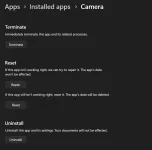
2. Reset the camera app: Open the Windows Settings app (Win + I), go to Apps -> Apps & features, locate the Camera app, click on it, and select Advanced options. In the new window, click on the Reset button to reset the camera app to its default settings.
3. Check for Windows updates: Make sure that your Windows 11 is up to date. Open the Settings app, go to Windows Update, and click on Check for updates. Install any available updates and restart your laptop if necessary.
4. Run the Hardware and Devices troubleshooter: Open the Settings app, go to System -> Troubleshoot, and under Find and fix other problems, select Hardware and Devices. Follow the on-screen instructions to run the troubleshooter and see if it can detect and fix any issues with the camera.
If none of the above steps resolve the issue, it's possible that there might be a hardware problem with the camera itself. In that case, I recommend reaching out to HP support or taking your laptop to an authorized HP service center for further assistance.
I hope these steps help you resolve the camera issue on your HP laptop. Good luck, and I hope you can use your camera successfully soon!
 PH
PH