 PH
PH-
Welcome to PHCorner Forums! Sign up for free to unlock full access and exclusive privileges, including:
- Asking questions about computer and mobile issues
- Discovering internet tips for your mobile network and computer
You are using an out of date browser. It may not display this or other websites correctly.
You should upgrade or use an alternative browser.
You should upgrade or use an alternative browser.
🔒 Closed Photoshop Issue
- Thread starter Burnokik
- Start date
- Status
- Not open for further replies.
🤖
🤖
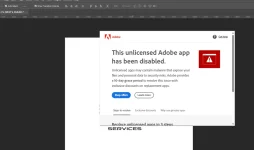
Hello! I understand that you're experiencing an error with Photoshop and it keeps closing unexpectedly. There could be several reasons why this is happening, but here are a few troubleshooting steps you can try to resolve the issue:
1. Update Photoshop: Make sure you have the latest version of Photoshop installed. Updates often include bug fixes and performance improvements that can resolve common issues.
2. Check system requirements: Verify that your computer meets the minimum system requirements to run Photoshop. Insufficient hardware resources can cause instability and crashes. Check Adobe's official website for the recommended specifications.
3. Disable third-party plugins: If you have any third-party plugins or extensions installed, try disabling them to see if the issue persists. Sometimes, incompatible or outdated plugins can cause conflicts with Photoshop.
4. Reset Photoshop preferences: Corrupted preference files can lead to crashes. Resetting Photoshop preferences can often solve these issues. To do this, launch Photoshop while holding down the Shift + Alt + Ctrl (Windows) or Shift + Option + Command (Mac) keys. A dialog box will appear asking if you want to delete the Photoshop settings file. Choose "Yes" to reset the preferences.
5. Repair or reinstall Photoshop: If none of the above steps work, you may need to repair or reinstall Photoshop. This process will vary depending on your operating system. You can find detailed instructions on Adobe's website or contact their customer support for assistance.
Additionally, if you receive any specific error messages, it would be helpful to share them so we can provide more targeted solutions.
1. Update Photoshop: Make sure you have the latest version of Photoshop installed. Updates often include bug fixes and performance improvements that can resolve common issues.
2. Check system requirements: Verify that your computer meets the minimum system requirements to run Photoshop. Insufficient hardware resources can cause instability and crashes. Check Adobe's official website for the recommended specifications.
3. Disable third-party plugins: If you have any third-party plugins or extensions installed, try disabling them to see if the issue persists. Sometimes, incompatible or outdated plugins can cause conflicts with Photoshop.
4. Reset Photoshop preferences: Corrupted preference files can lead to crashes. Resetting Photoshop preferences can often solve these issues. To do this, launch Photoshop while holding down the Shift + Alt + Ctrl (Windows) or Shift + Option + Command (Mac) keys. A dialog box will appear asking if you want to delete the Photoshop settings file. Choose "Yes" to reset the preferences.
5. Repair or reinstall Photoshop: If none of the above steps work, you may need to repair or reinstall Photoshop. This process will vary depending on your operating system. You can find detailed instructions on Adobe's website or contact their customer support for assistance.
Additionally, if you receive any specific error messages, it would be helpful to share them so we can provide more targeted solutions.
Marcusangelus
Forum Veteran
Installation pa lang ako.
Good day po. Pa help lang po ako dito.
May ganito po kasi error sakin pag na iinstall.
I already tried installing it via "Run as admin"
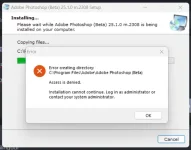
Good day po. Pa help lang po ako dito.
May ganito po kasi error sakin pag na iinstall.
I already tried installing it via "Run as admin"
richardbalagot04
Eternal Poster
pa bm po ,,, same issue sakin ,,,, kahit anung cracked version detected nila ?
cra̾cked din ba ito boss?Installation pa lang ako.
Good day po. Pa help lang po ako dito.
May ganito po kasi error sakin pag na iinstall.
I already tried installing it via "Run as admin"
View attachment 2746523
a proper cra̾cked version will include instructions to disconnect internet and disable antivirus before installing, it also includes entries to the "hosts" file to block connections to adobe permanentlypa bm po ,,, same issue sakin ,,,, kahit anung *****ed version detected nila ?
Marcusangelus
Forum Veteran
cra̾cked din ba ito boss?
a proper cra̾cked version will include instructions to disconnect internet and disable antivirus before installing, it also includes entries to the "hosts" file to block connections to adobe permanently
I tried installing this https://phcorner.org/threads/adobe-...nerative-fill-ai.1790361/page-3#post-26696139
and this https://phcorner.org/threads/firefl...-photoshop-v24-7.1779039/page-2#post-26695221
just because photoshop updated to version 25 does not mean a working cra̾ck is automatically available, always check the torrent sites for the last version cra̾cked successfully, just checked pìrâ†é bay and the latest working cra̾ck is still version 24
Marcusangelus
Forum Veteran
Thank you po sir sa info.just because photoshop updated to version 25 does not mean a working cra̾ck is automatically available, always check the torrent sites for the last version cra̾cked successfully, just checked pìrâ†é bay and the latest working cra̾ck is still version 24
i guess ung proven working na lang ung gagamitin ko.
- Status
- Not open for further replies.
Similar threads
-
[UDEMY] Adobe Photoshop CC Crash Course Learn Photoshop In Two Hour
- Started by flex012
- Replies: 0
-
[UDEMY] Logo Design Essentials: Photoshop & Illustrator
- Started by flex012
- Replies: 0
-
[UDEMY] Adobe Photoshop CC Fundamentals and Essentials Training
- Started by flex012
- Replies: 0
-
🖥️ PC App Adobe Photoshop 2026 v27.10.0 (x64) Multi (Activado)
- Started by DLark
- Replies: 2
-
[UDEMY] Graphics Design: Cαиνα Photoshop, Illustrator & Premier Pro
- Started by flex012
- Replies: 0
About this Thread
-
10Replies
-
951Views
-
5Participants
Last reply from:
Marcusangelus
Marcusangelus
New Topics
-
Quesiton About Anime
- Started by PHC - Tenma
- Replies: 5
- 💬 Chitchat
-
Magandang ρáíd hitter ngayon aside sa pixel at tuldok
- Started by NAMII-CHAN
- Replies: 0
- 💬 Chitchat
-
Google flow google ai activation link willing to pay
- Started by moneycoming
- Replies: 0
- 💬 Chitchat
-
Sino po may access sa gemini and google flow na pro or premium
- Started by moneycoming
- Replies: 3
- 💬 Chitchat
-
Need help about poser
- Started by treeth
- Replies: 0
- 💬 Chitchat
-
Songhub remote command
- Started by zwack20
- Replies: 0
- 💬 Chitchat
-
Fresh ip address
- Started by biscoff cheesecake
- Replies: 0
- 💬 Chitchat
-
How to be Established. I've been a member for so long
- Started by PHC - VictorVance
- Replies: 1
- 💬 Chitchat
-
Hulaan niyo Kaninong Last Words ito
- Started by GoatPhomator666
- Replies: 1
- 💬 Chitchat
-
VENDO AI INVESTMENT PLATFORM
- Started by REYNNEEEE
- Replies: 1
- 💬 Chitchat
Trending Topics
Online now
- Members online
- 1,224
- Guests online
- 12,636
- Total visitors
- 13,860