 PH
PHDaVinci Resolve Studio 18 Free Download
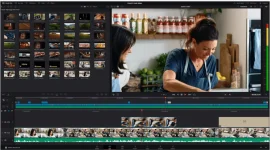
DaVinci Resolve Studio 18 PreActivated is a modern interface that is extremely simple to use, ideal for beginners, but also very complete for professionals. In addition, the program allows one to carry out faster work dynamics and with higher quality, thanks to the fact that it is not necessary to learn to use multiple applications or change the software.This means that original images from the camera can be processed throughout the process. It’s like having your own post-production studio in one app. The best part is that DaVinci Resolve offers the same tools that Hollywood professionals use.
Features of DaVinci Resolve Studio 18
- Professional Editing
- Blending Effects
- Color Correction
- Fair light Audio
- Media & Delivery
- Multi-User Collaboration
- DaVinci Resolve Studio
- New High-Performance Playback Engine
- Legendary DaVinci Quality
- Hardware Control Panels
- Professional Fair light Consoles
- Open and compatible
What’s new in DaVinci Resolve 18
DaVinci Resolve Studio 18 offers a new way to process wide color spectrum images, three-dimensional surround sound, and innovative tools for grading with high dynamic range, as well as the Magic Mask function, based on artificial intelligence. The Fairlight module provides enhancements in the selection of keyboard and mouse editing modes, and a high-performance audio engine called the Fairlight Audio Core, which supports 2,000 tracks on a single system.In addition, the program includes a renewed virtual clapperboard with metadata and dividers for trays, in order to organize and find the material more quickly, expanded waveforms to edit the audio, intelligent resynchronization, proxy files, and preview of effects in real-time. In turn, the titles, effects, and compositions created in the Fusion module can be used in the Editing and Montage modules.
DAVINCI RESOLVE STUDIO 18 SYSTEM REQUIREMENTS
Operating System: Windows 11 / Windows 10 Update (64 Bits)Memory: 16 GB of RAM. 32GB when using Fusion
Processor: Intel i3 2 GHz or Higher
GPU: Integrated or discrete GPU with at least 2GB of VRAM
GPU that supports OpenCL 1.2 or CUDA 10
NVIDIA / AMD / Intel GPU Driver Version – As Required by Your GPU
DATA SHEET
Software: DaVinci Resolve 18Developer: You do not have permission to view the full content of this post. Log in or register now.
Language: Multi_language
Medicine: Pre-Activated
Download Here: You do not have permission to view the full content of this post. Log in or register now.
