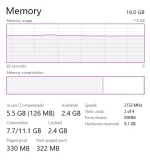
Kinakain ng "Hardware Reserved" ram ko, help?

ABCwarrior21

Journeyman
1692089794270.png

EDIT: RAM ko pala is Corsair Vengance RGB Pro 16GB

Hi mga ka PHC,

Straight to he point, naglalaro lang ako ng CS2 2 days ago and for some reason nag blue screen sya, i didnt think any of it baka bigla lang may nangyari sa system ko etc ganyan, tapos i noticed parang bumagal PC ko and today ko lang tiningnan Task Manager ko and nakita kong kumalahati ram ko and kinakain ng Hardware reserved, di nmn sya ganito dati?

Dinaan ko na sya sa Windows Memory Diagnostic check and no problems nmn...

Any idea for fix? thx
 
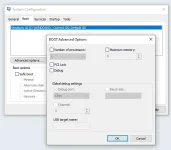
Nasa bios yan or sa system configuration > boot > advance options... > maximum memory.
Minsan kasi mag reserve sya dahil sa GPU.
 
If I assume wala gpu ang unit kaya napupunta jan. send yung full screenshot ng task manager under processor. para malaman kung gumagamit ng built in graphics.

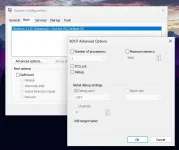
win + r. msconfig. check kung ano nakalagay dito.
1692090319215.png

mostly kaya fixed yan pag nag install na windows graphics driver galing sa windows update.
sa ram na to kukuha ng graphics memory pag na configure maayos. ganyan kasi mga old processor.
 
Nasa bios yan or sa system configuration > boot > advance options... > maximum memory.
Minsan kasi mag reserve sya dahil sa GPU.
If I assume wala gpu ang unit kaya napupunta jan. send yung full screenshot ng task manager under processor. para malaman kung gumagamit ng built in graphics.

win + r. msconfig. check kung ano nakalagay dito.
Na check ko na din to... Looks normal to me?
1692090659064.webp

If I assume wala gpu ang unit kaya napupunta jan. send yung full screenshot ng task manager under processor. para malaman kung gumagamit ng built in graphics.
1692090686157.webp

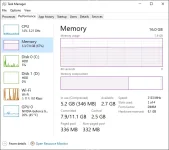
Eto full pic, may GPU po sya.

ginagawa ko jan reseat muna pag wala parin try lower mo lower MHZ ng ram then slowly to 3200mhz
Try ko muna icheck bios and then try ko ireseat RAMs, ty.
 
try switching your ram sticks or replace it all together to higher mhz. all solutions seems to be temporary fix.
reinstall windows os should fix your problem but not sure if permanent fix.
 
Taeeee saammee ganyan din sakin :'< buti sana kung antaas ng RAM eh pero 12gb lang naman 9.1gb lang usable dahil sa System reserved :'<
 
go to cmd type this one " wmic memorychip get speed " pag nakita mo na nagdisplay yung dalawang speed ng ram mo then time to go bios check mo sa bios if nakikita ba na nakadisplay yung dalawang ram stick at yung speed nila if wala then remove the sticks clean it and then after reset your bios to default nalang muna , na try ko yang ganyan sa old unit ko nagdisplay sa task manager is yung total memory ng ram tas pagtingin ko ng usable is kalahati lang pero yan ginawa ko remove and clean lang tas reset to default
 
Hello, forgot to reply here, nafix ko na sya, all i did was reset bios and i swapped their positions on the ram slots. complete 16gb na uli ram na nagagamit ko. ty sa mga help guys.
 

Similar threads

About this Thread

  • 12
    Replies
  • 2K
    Views
  • 9
    Participants
Last reply from:
ABCwarrior21

Trending Topics

Online now

Members online
1,056
Guests online
1,261
Total visitors
2,317

Forum statistics

Threads
2,274,558
Posts
28,956,765
Members
1,234,291
Latest member
LeonSq
Back
Top