PH
PHHow to make Android YouTube app faster and make YouTube videos loader quicker
There is a small feature hidden inside the YouTube app called ExoPlayer. ExoPlayer is an experimental video player that Google has implemented in the latest version of the YouTube app but it is disabled for some reason. The ExoPlayer makes videos to load much faster than normally. To activate ExoPlayer on the YouTube app, you only need to have root access.
Download a file manager with root access like ES File Manager or Root Explorer.
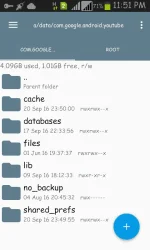
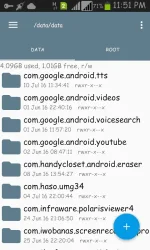
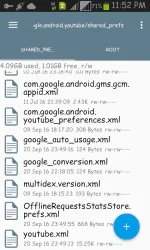
Open file manager and go to /data/data/com.google.android.youtube/shared_prefs. Find a file called youtube.xml.
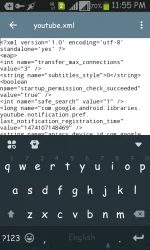
Edit youtube.xml file using a text editor. Find <map> and add these lines just below it.
<string name="exo_player_activation_type">ADAPTIVE</string>
<boolean name="enable_exo_cache" value="true"/>
<boolean name="show_exo_player_debug_messages" value="true"/>
There is a small feature hidden inside the YouTube app called ExoPlayer. ExoPlayer is an experimental video player that Google has implemented in the latest version of the YouTube app but it is disabled for some reason. The ExoPlayer makes videos to load much faster than normally. To activate ExoPlayer on the YouTube app, you only need to have root access.
Download a file manager with root access like ES File Manager or Root Explorer.
Open file manager and go to /data/data/com.google.android.youtube/shared_prefs. Find a file called youtube.xml.
Edit youtube.xml file using a text editor. Find <map> and add these lines just below it.
<string name="exo_player_activation_type">ADAPTIVE</string>
<boolean name="enable_exo_cache" value="true"/>
<boolean name="show_exo_player_debug_messages" value="true"/>