 PH
PHPHC - plokplok
┌∩∩∩┐(◣_◢)┌∩∩∩┐
Effective ito lalo na sa naka Data.
* Maaari lang itong makatulong sa internet speed especially sa browsing and gaming pero kung mabagal talaga ang net sa location mo wala nang magagawa doon.
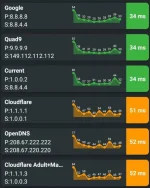
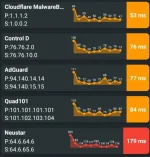
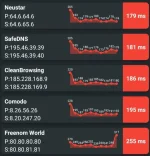
Android 8 and Below
DNS Changer by Frostnerd
* IPv4 and IPv6
You do not have permission to view the full content of this post. Log in or register now.
Nebulo by Frostnerd
If Rooted ang Phone mo then change DNS nalang sa Host file.
Android 9+
1) Go to Settings and Search for Private DNS
2) Turn Private DNS On
3) From "Auto" to Custom Private DNS and select one DNS-over-TLS server from the list below.
For Wifi Users / Modem
Via Wifi Connection Settings
1) Go to Wifi Settings
2) Tap&Hold the Wifi you are connected, Select "Modify Network"
3) Check "Show Advanced Options"
4) Change IP Setting from "Dynamic" to "Static"
5) Change DNS1 and DNS2 to your desired DNS Server (IPv4).
Via Modem
1) Go to your Modem's Portal.
2) Find DHCP Settings and Change DNS then save.
DNS List
CloudFlare
Google
Quad9
AdGuard
* Maaari lang itong makatulong sa internet speed especially sa browsing and gaming pero kung mabagal talaga ang net sa location mo wala nang magagawa doon.
Android 8 and Below
DNS Changer by Frostnerd
* IPv4 and IPv6
You do not have permission to view the full content of this post. Log in or register now.
Nebulo by Frostnerd
- Newer and More Secure
- DNS-over-HTTPS
- DNS-over-TLS
If Rooted ang Phone mo then change DNS nalang sa Host file.
Android 9+
1) Go to Settings and Search for Private DNS
2) Turn Private DNS On
3) From "Auto" to Custom Private DNS and select one DNS-over-TLS server from the list below.
For Wifi Users / Modem
Via Wifi Connection Settings
1) Go to Wifi Settings
2) Tap&Hold the Wifi you are connected, Select "Modify Network"
3) Check "Show Advanced Options"
4) Change IP Setting from "Dynamic" to "Static"
5) Change DNS1 and DNS2 to your desired DNS Server (IPv4).
Via Modem
1) Go to your Modem's Portal.
2) Find DHCP Settings and Change DNS then save.
DNS List
CloudFlare
Code:
CloudFlare Default
IPv4: 1.1.1.1 & 1.0.0.1
IPv6: 2606:4700:4700::1111
          2606:4700:4700::1001
DNS-over-HTTPS: https://dns.cloudflare.com/dns-query
DNS-over-TLS: 1dot1dot1dot1.cloudflare-dns.com

CloudFlare Malware Blocking
IPv4: 1.1.1.2 & 1.0.0.2
IPv6: 2606:4700:4700::1112
          2606:4700:4700::1002
DNS-over-HTTPS: https://security.cloudflare-dns.com/dns-query
DNS-over-TLS: security.cloudflare-dns.com

CloudFlare Malware+Adůlt Content Blocking
IPv4: 1.1.1.3 & 1.0.0.3
IPv6: 2606:4700:4700::1113
          2606:4700:4700::1003
DNS-over-HTTPS: https://family.cloudflare-dns.com/dns-query
DNS-over-TLS: family.cloudflare-dns.com
Code:
IPv4: 8.8.8.8 & 8.8.4.4
IPv6: 2001:4860:4860::8888
          2001:4860:4860::8844
DNS-over-HTTPS: https://dns.google/dns-query
DNS-over-TLS: dns.google
Quad9
Code:
IPv4: 9.9.9.9 & 149.112.112.112
IPv6: 2620:fe::fe
          2620:fe::fe:9
DNS-over-HTTPS: https://dns.quad9.net/dns-query
DNS-over-TLS: dns.quad9.net
AdGuard
Code:
AdGuard Default (AdBlock)
IPv4: 94.140.14.14 & 94.140.15.15
IPv6: 2a10:50c0::ad1:ff
          2a10:50c0::ad2:ff
DNS-over-HTTPS: https://dns.adguard-dns.com/dns-query
DNS-over-TLS: dns.adguard-dns.com

AdGuard Family (Adůlt Content Blocking)
IPv4: 94.140.14.15 & 94.140.15.16
IPv6: 2a10:50c0::bad1:ff
          2a10:50c0::bad2:ff
DNS-over-HTTPS: https://family.adguard-dns.com/dns-query
DNS-over-TLS: family.adguard-dns.com

AdGuard Non-Filtering
IPv4: 94.140.14.140 & 94.140.14.141
IPv6: 2a10:50c0::1:ff
          2a10:50c0::2:ff
DNS-over-HTTPS: https://unfiltered.adguard-dns.com/dns-query
DNS-over-TLS: unfiltered.adguard-dns.com