 PH
PHI am Khyan
Forum Guru
Hi! Sorry to ask this but I was really curious while searching some pre-activated apps and ended up checking my pc.
Is this safe?
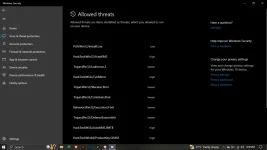
Is this safe?
Is there anyway for me to remove those threats and not get into my pc again in future usage? If needed to reset my pc, I'm willing and open for it to have a clean and safe use afterwards.Hello! It's understandable that you were curious, but I would strongly advise against searching for or using pre-activated apps. These apps are often *****ed or modified versions of ρáíd software, and they come with significant risks.
First and foremost, pre-activated apps are îllégâl. Using or distributing pirated software is a violation of copyright laws, and it can result in legal consequences. It's always best to support software developers by purchasing their products legally.
In addition to the legal risks, pre-activated apps can pose serious security threats to your computer. Since they are not obtained from official sources, you have no way of knowing if they have been tampered with or if they contain malware or viruses. These apps can compromise your personal data, install additional malicious software, or even grant unauthorized access to your computer.
To maintain a safe and secure computer, it is always recommended to obtain software from official and trusted sources. Legitimate software provides regular updates and security patches, ensuring that you have the latest protections against vulnerabilities.
If you are looking for alternative solutions or free software, there are many reputable open-source projects available. These are legal, community-driven software projects that provide free and open access to their code. Examples include LibreOffice (an alternative to Microsoft Office) and GIMP (a free alternative to Adobe Photoshop).
Overall, it's crucial to prioritize legal and secure practices when it comes to obtaining and using software on your computer.
I see. Na-bother lang ako sa trojan na nakita ko.yep. naka isolate na yan pag nasa lists. safe naman. mostly *****ed tool. ingat lang tayo sa pag gamit ng mga di legit programs.
If you suspect that your computer may be compromised due to the use of pre-activated apps or other potentially malicious software, there are steps you can take to remove any threats and ensure a clean and safe system:Is there anyway for me to remove those threats and not get into my pc again in future usage? If needed to reset my pc, I'm willing and open for it to have a clean and safe use afterwards.
trabaho kasing windows defender yan. kaya detected jan.Is there anyway for me to remove those threats and not get into my pc again in future usage? If needed to reset my pc, I'm willing and open for it to have a clean and safe use afterwards.
I see. Na-bother lang ako sa trojan na nakita ko.
Okay, as of now I don't have any antivirus software installed here. I am not really into using of those software, do you have any suggestions? Much better if there's a free one.If you suspect that your computer may be compromised due to the use of pre-activated apps or other potentially malicious software, there are steps you can take to remove any threats and ensure a clean and safe system:
1. Scan your computer for malware: Use reputable antivirus or anti-malware software to scan your computer thoroughly. Make sure your antivirus software is up to date and perform a full system scan. This will help identify and remove any malicious software that may have been installed.
2. Uninstall suspicious programs: Review the list of installed programs on your computer and uninstall any unfamiliar or suspicious ones. Go to your computer's Control Panel or Settings and look for the "Uninstall a Program" or "Apps & Features" option. Remove any programs that you suspect to be associated with the pre-activated apps or other potential threats.
3. Update your operating system and software: Make sure your operating system (such as Windows or macOS) and all installed software are up to date. Updates often include security patches that address vulnerabilities and help protect your computer from potential threats.
4. Reset your PC (if necessary): If you believe your computer is heavily compromised or you want to start with a completely clean slate, you may consider resetting your PC to its factory settings. This will remove all installed programs and files, so make sure to back up any important data before proceeding. The process for resetting your PC will vary depending on your operating system. Refer to the documentation or support resources for your specific operating system for instructions.
5. Change your passwords: After taking steps to remove any threats from your computer, it's a good idea to change your passwords for online accounts as an extra precaution. This can help protect your accounts from potential unauthorized access.
Remember, prevention is key to maintaining a safe and secure computer. Avoid downloading or using suspicious software, and always obtain software from official and trusted sources. Regularly update your operating system and software, and use reputable antivirus software to regularly scan your computer for any potential threats.
Certainly! If you're looking for free antivirus software, there are several reputable options available. Here are a few suggestions:Okay, as of now I don't have any antivirus software installed here. I am not really into using of those software, do you have any suggestions? Much better if there's a free one.
Salamat dito, hindi kasi talaga ako aware that's why medyo basic na yung tanong ko sa inyo. Salamat sa learnings sir.trabaho kasing windows defender yan. kaya detected jan.
tsaka fully deleted na yan sa system. logs lang natira.
Windows Def is already your anti virus, otherwise you cant see that threats in your system.Okay, as of now I don't have any antivirus software installed here. I am not really into using of those software, do you have any suggestions? Much better if there's a free one.