🔒 Closed Easy way to know how fast ur connection is

Status
Not open for further replies.

Netizenlang

Grasshopper
Sundan Lang po ang step by step

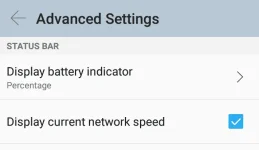
Purpose nito ay para makita ang speed connection mo all the time!
Sana maka tulong!

Setting Lang ng cellphones nyo.
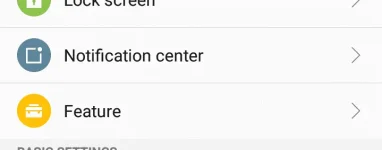
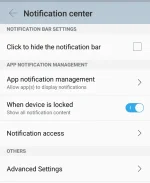
Settings > notification center > advanced settings > (check box display current network speed)
Sundan ang pictures basic lang po hehe

 

Attachments

  • Screenshot_2016-09-13-01-51-34-217.webp
    Screenshot_2016-09-13-01-51-34-217.webp
    102.9 KB · Views: 39
  • Screenshot_2016-09-17-01-11-19-998.webp
    Screenshot_2016-09-17-01-11-19-998.webp
    10.7 KB · Views: 34
  • Screenshot_2016-09-17-01-11-35-187.webp
    Screenshot_2016-09-17-01-11-35-187.webp
    32.7 KB · Views: 35
  • Screenshot_2016-09-17-01-11-56-204.webp
    Screenshot_2016-09-17-01-11-56-204.webp
    13.3 KB · Views: 31
Di po rooted ang cp ko sir.
Lollipop version po.
Pero try po kalkalin nyo settings or Kung may search window po sa setting. Search nyo ung display speed :) sana makatulong
 
di sa lahat ng phone meron nyan.
kung gusto nyo ng ganyan dapat rooted, install exposed at gravity box.
kapag non rooted naman internet speed meter normal/pro
 
Status
Not open for further replies.

About this Thread

  • 16
    Replies
  • 965
    Views
  • 12
    Participants
Last reply from:
claigeo11

Online now

Members online
998
Guests online
2,388
Total visitors
3,386

Forum statistics

Threads
2,288,837
Posts
29,054,441
Members
1,214,308
Latest member
IcHo24
Back
Top