PH
PHHello Friends, Today I'm posting about a How to resume expired link in the UC Browser. It is very simple and 100% working. I always go with this trick when I got link expired error in UCBrowser. I hope this post helps you. Follow the given steps and resume link.
Steps to resume link:
Open UCBrowser.
Go to Downloads.
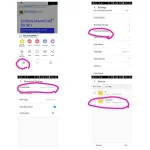
Hold the file which download link is expired or which is not resuming.
After holding you got some information about the file.
At the last you see download page.
Copy that link.
And open that link/page.
And download starts again.
When you download window that time rename that file.
When file downloaded up-to 200kb.
Then pause.
Close the UCBrowser.
Open file manager and go to UCDownloads folder.
Copy the old downloaded (which is not resuming ) file and that file with .dltemp extension. In another folder for backup purpose.
Now copy the name of new downloaded file and delete new downloaded file and rename the non resumable file and paste the copied name.
Same for dltemp file.
After that, open UCBrowser and resume.
Your download has started now.
I hope this trick will solve your problem and you will able to resume trick.
Steps to resume link:
Open UCBrowser.
Go to Downloads.
Hold the file which download link is expired or which is not resuming.
After holding you got some information about the file.
At the last you see download page.
Copy that link.
And open that link/page.
And download starts again.
When you download window that time rename that file.
When file downloaded up-to 200kb.
Then pause.
Close the UCBrowser.
Open file manager and go to UCDownloads folder.
Copy the old downloaded (which is not resuming ) file and that file with .dltemp extension. In another folder for backup purpose.
Now copy the name of new downloaded file and delete new downloaded file and rename the non resumable file and paste the copied name.
Same for dltemp file.
After that, open UCBrowser and resume.
Your download has started now.
I hope this trick will solve your problem and you will able to resume trick.