Lenovo L340

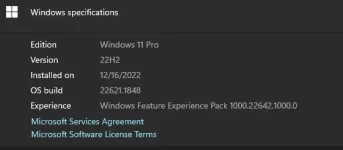
ung tinry ko lang boss format parin pero sa home single parin diko sure kung factory format ang nangyari.
format mo sa windows 10/11 pro akin kasi naka pro na nung nabili ko sa seller
1688475188948.webp
 
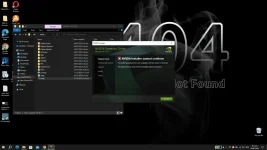
nainstall ko bosss latest minsan kaso di parin nagwowork
subukan mo ito ts:

#1 – Update NVIDIA Graphics Card Driver Manually

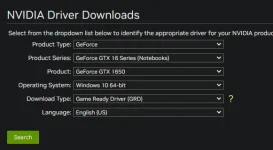
To upgrade NVIDIA Graphics Card Driver Manually to fix the NVIDIA Installer Cannot Continue error, first of all, you will need to download the latest compatible driver for your graphics card on your computer.

To do so, go to the You do not have permission to view the full content of this post. Log in or register now. webpage. There, you will need to provide the following information about your graphics card along with the Operating System installed on your computer: Product Type, Product Series, and Product.

You do not have permission to view the full content of this post. Log in or register now.

Once downloaded follow these steps:

Step 1: Press Windows + X keys at a time on your keyboard, then a list will appear. From the list, double click on the Device Manager option.

You do not have permission to view the full content of this post. Log in or register now.

Step 2: In Device Manager, click on the Display adapters option to expand it. Now, right click on the NVIDIA Graphics Card option from the expanded list, then click on Update driver option.

You do not have permission to view the full content of this post. Log in or register now.

Step 3: From the Update Drivers window that appears, click on Browse my computer for driver software option.

You do not have permission to view the full content of this post. Log in or register now.

Step 4: Now, you will get an option to browse and load NVIDIA driver from your PC. Browse and select the driver you just downloaded from the NVIDIA Driver webpage. Click Next and follow on-screen instructions to complete the NVIDIA Driver installation.

You do not have permission to view the full content of this post. Log in or register now.

Step 5: Restart your computer and try to install NVIDIA Graphics Card on your PC.
 
NaTry ko na din yan boss. Hahaha
subukan mo ito ts:

#1 – Update NVIDIA Graphics Card Driver Manually

To upgrade NVIDIA Graphics Card Driver Manually to fix the NVIDIA Installer Cannot Continue error, first of all, you will need to download the latest compatible driver for your graphics card on your computer.

To do so, go to the You do not have permission to view the full content of this post. Log in or register now. webpage. There, you will need to provide the following information about your graphics card along with the Operating System installed on your computer: Product Type, Product Series, and Product.

You do not have permission to view the full content of this post. Log in or register now.

Once downloaded follow these steps:

Step 1: Press Windows + X keys at a time on your keyboard, then a list will appear. From the list, double click on the Device Manager option.

You do not have permission to view the full content of this post. Log in or register now.

Step 2: In Device Manager, click on the Display adapters option to expand it. Now, right click on the NVIDIA Graphics Card option from the expanded list, then click on Update driver option.

You do not have permission to view the full content of this post. Log in or register now.

Step 3: From the Update Drivers window that appears, click on Browse my computer for driver software option.

You do not have permission to view the full content of this post. Log in or register now.

Step 4: Now, you will get an option to browse and load NVIDIA driver from your PC. Browse and select the driver you just downloaded from the NVIDIA Driver webpage. Click Next and follow on-screen instructions to complete the NVIDIA Driver installation.

You do not have permission to view the full content of this post. Log in or register now.

Step 5: Restart your computer and try to install NVIDIA Graphics Card on your PC.
 
one issue fix paps punta ka sa avg driver updater website install mo using 7days free trial tapos update mo dun drivers mo mafifix lahat ng errors na occured
 

Similar threads

About this Thread

  • 31
    Replies
  • 2K
    Views
  • 6
    Participants
Last reply from:
xBlackEye

Trending Topics

Online now

Members online
945
Guests online
1,132
Total visitors
2,077

Forum statistics

Threads
2,276,697
Posts
28,971,607
Members
1,230,459
Latest member
tantantanjshshs
Back
Top