🔒 Closed Free coc setting!

Status
Not open for further replies.

PHC-Batugan

Forum Veteran
or COC users, Here some setting for APN to play CLASH of CLAN (Smart only and
No LOAD required).

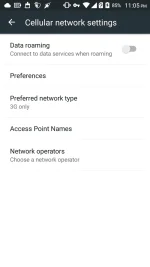
  1. Go to SETTING, Mobile Network and findAPN(Access Point Name).
  2. Create New APN and Name as COC APN or any name that you want.
  3. After creating New APN, let's edit the settings below.
Now follow the setting below:
  • APN: www1.safezone.ph
  • Proxy: 357.51.001.43
  • Port: 80
After edit, You can save now this setting as your APN. Try to reboot or restart your phone and wait till the DATA "H+" is ready.

Now! Try to open Clash of Clan and Clash Onnnn... !!!

Note: If working guys sa inyo feed back na lang po, Naka depende po kasi ang tricks na to sa Area or sa SIM card kaya sa Phone nyo nakasalalay ang lahat. Thanks for reading
 
If ayaw? need mo nang *HI LINK* sa smart bro yung pocket wifi ko kase HUAWEI, May HI LINK Po ako. Dun ko na po na i-set at working po sya.
 

Attachments

  • Screenshot_2016-09-15-23-05-38.webp
    Screenshot_2016-09-15-23-05-38.webp
    31.2 KB · Views: 35
Thanks for sharing ts...
Pang back up din to... keep on sharing..
Sa psiphon naman, naka depende pa rin sa location mo ang bilis ng net. Mas mabilis na net mas maganda mag Coc at iba pa.. sa ngayon ok pa rin naman si ponpon..:)
pwede kyang pasipaan yan ky psiphon par bumilis ts
 
Status
Not open for further replies.

About this Thread

  • 23
    Replies
  • 4K
    Views
  • 19
    Participants
Last reply from:
mark1718

Online now

Members online
400
Guests online
1,528
Total visitors
1,928

Forum statistics

Threads
2,275,511
Posts
28,963,765
Members
1,232,825
Latest member
wrucebayne
Back
Top