PH
PHBAD_KING_PH OFFICIAL
Elite
Paano nga ba magReduce sa ML?
1. Download You do not have permission to view the full content of this post. Log in or register now. & Install
2. Open mo ML mo. Kung all sources is Downloaded na.
3. Close ML App.
4. Open ZAchiever AndroidDatacom.mobile.legendsfilesdragon2017assetssearchbar(
 )Type: high_add, (delete all) cityaction (delete all) colour (delete all). After mo nadelete yan
. Few second ka lang. Back lang. Pero nandoon ka parin sa
com.mobile.legendsfilesdragon2017assets
5. Delete mo folder ng cdnTemp
6. may makikita kang OnFlag.data rename as cdnTemp no need type (.data)
7. That's its Enjoy..

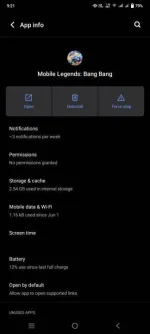
Reduce ng Storage ng ML ko is 6gb plus into 2gb plus na lang. FeedBack pag gumana sayo.
#Share
1. Download You do not have permission to view the full content of this post. Log in or register now. & Install
2. Open mo ML mo. Kung all sources is Downloaded na.
3. Close ML App.
4. Open ZAchiever
AndroidDatacom.mobile.legendsfilesdragon2017assetssearchbar()Type: high_add, (delete all) cityaction (delete all) colour (delete all). After mo nadelete yan. Few second ka lang. Back lang. Pero nandoon ka parin sa
com.mobile.legends
filesdragon2017assets5. Delete mo folder ng cdnTemp
6. may makikita kang OnFlag.data rename as cdnTemp no need type (.data)
7. That's its Enjoy..
Reduce ng Storage ng ML ko is 6gb plus into 2gb plus na lang.
FeedBack pag gumana sayo. #Share