 PH
PH-
Welcome to PHCorner Forums! Sign up for free to unlock full access and exclusive privileges, including:
- Asking questions about computer and mobile issues
- Discovering internet tips for your mobile network and computer
You are using an out of date browser. It may not display this or other websites correctly.
You should upgrade or use an alternative browser.
You should upgrade or use an alternative browser.
❓ Help Sleep option is missing on windows 10
- Status
- Not open for further replies.
🤖
🤖
Hello! I'm sorry to hear that you are having trouble finding the sleep option in Windows 10. There could be several reasons why the sleep option is missing, but here are a few things you can try to get it back:
1. Check your power settings: Make sure that your power settings are configured to allow your computer to sleep. You can access power settings by right-clicking on the battery icon in the taskbar and selecting "Power Options." From there, click on "Choose when to turn off the display" and "Change when the computer sleeps" to adjust your settings.
2. Check your device drivers: If your device drivers are outdated or missing, it can cause issues with power management. Try updating your drivers by going to the device manager (right-click on the Start button and select "Device Manager") and checking for updates.
3. Check for Windows updates: Sometimes missing features can be restored by updating Windows. Check for updates by going to Settings > Update & Security > Windows Update.
4. Try using a keyboard shortcut: If you are still having trouble finding the sleep option, you can try using a keyboard shortcut. Press the Windows key + X and then press U to bring up the power options menu, which includes a Sleep option.
I hope these suggestions are helpful! Let me know if you have any further questions or concerns.
1. Check your power settings: Make sure that your power settings are configured to allow your computer to sleep. You can access power settings by right-clicking on the battery icon in the taskbar and selecting "Power Options." From there, click on "Choose when to turn off the display" and "Change when the computer sleeps" to adjust your settings.
2. Check your device drivers: If your device drivers are outdated or missing, it can cause issues with power management. Try updating your drivers by going to the device manager (right-click on the Start button and select "Device Manager") and checking for updates.
3. Check for Windows updates: Sometimes missing features can be restored by updating Windows. Check for updates by going to Settings > Update & Security > Windows Update.
4. Try using a keyboard shortcut: If you are still having trouble finding the sleep option, you can try using a keyboard shortcut. Press the Windows key + X and then press U to bring up the power options menu, which includes a Sleep option.
I hope these suggestions are helpful! Let me know if you have any further questions or concerns.
zackmark29
Elite
Go to:
1. Control Panel\Hardware and Sound\Power Options
2. Choose what the power buttons do
3. Change settings that are currently unavailable
4. Check Sleep
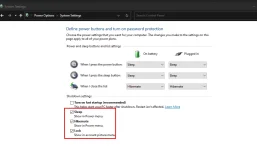
1. Control Panel\Hardware and Sound\Power Options
2. Choose what the power buttons do
3. Change settings that are currently unavailable
4. Check Sleep
same padin lods
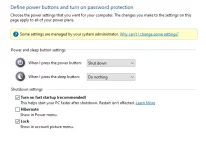 ganito lang
panu kaya to
walang nakalagay na sleep lodsGo to:
1. Control Panel\Hardware and Sound\Power Options
2. Choose what the power buttons do
3. Change settings that are currently unavailable
4. Check Sleep
View attachment 2682006
ganito langpanu kaya to
zackmark29
Elite
ahm try mo kaya sa gpedit tapos check mo enabled.
Windows + R then type gpedit.msc
Computer Configuration
Administrative Templates
Windows Components
File Explorer
Show sleep in the power options menu
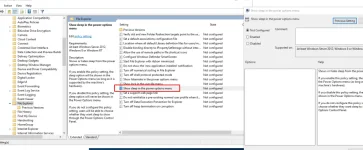
ganun padin lodsahm try mo kaya sa gpedit tapos check mo enabled.
Windows + R then type gpedit.msc
Computer Configuration
Administrative Templates
Windows Components
File Explorer
Show sleep in the power options menu
View attachment 2682017
Cyber Zhed
Honorary Poster
try mo to lods kung gagana
cltr + r
type "gpedit.msc"
Path: administrative Templates > Windows Components > File Explorer > Show sleep in the power options menu
double click and enable
cltr + r
type "gpedit.msc"
Path: administrative Templates > Windows Components > File Explorer > Show sleep in the power options menu
double click and enable
zackmark29
Elite
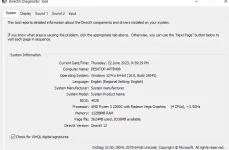
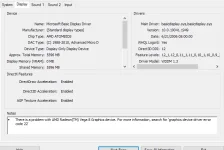
ss mo nga display tab sa dxdiagganun padin lods
Windows + R then dxdiag
zackmark29
Elite
Baka kasi wala kang nakainstall na graphics card/driver or naka Basic Display Adapter lang
oo lods naka ryzen 3 2200g lang akoBaka kasi wala kang nakainstall na graphics card or naka Basic Display Adapter lang
zackmark29
Elite
oo lods naka ryzen 3 2200g lang ako
View attachment 2682032
Yung display tab
zackmark29
Elite
For sure problem niyan is naka default grapics driver lang naka installed sa laptop/PC mo
ngayon lang nagka ganito
panu po gagawin ko ?For sure problem niyan is naka default grapics driver lang naka installed sa laptop/PC mo
zackmark29
Elite
Saabi na eh hahaha install ka Graphics Card Driver or Display Driver.
Search mo yang specs ng PC/Laptop mo kung anong tamang driver para diyan. Or Windowds Update nalang para automatic
naka full update yung pc ko ehSaabi na eh hahaha install ka Graphics Card Driver or Display Driver.
Search mo yang specs ng PC/Laptop mo kung anong tamang driver para diyan. Or Windowds Update nalang para automatic
zackmark29
Elite
Pero naka Microsoft Basic Display Driver lang naka intall. See mo sa ss mo sa dxdiagnaka full update yung pc ko eh
You do not have permission to view the full content of this post. Log in or register now.
Eto:
You do not have permission to view the full content of this post. Log in or register now.
- Status
- Not open for further replies.
Similar threads
About this Thread
-
30Replies
-
1KViews
-
4Participants
Last reply from:
MaruJo
MaruJo
New Topics
-
Help po !!!! My account got häçked Facebook and steam
- Started by bujoy20
- Replies: 6
- ❓ Computer Discussion & Support
-
Replace laptop lcd
- Started by toki07
- Replies: 0
- ❓ Computer Discussion & Support
-
Mga bossing patulong po nahäçk account ko due to carelessness
- Started by Jeii
- Replies: 2
- ❓ Computer Discussion & Support
-
Computer parts na cheap
- Started by bjenjay1
- Replies: 1
- ❓ Computer Discussion & Support
-
PC APPS - remote or auto saved type and auto audio
- Started by babyzero
- Replies: 0
- ❓ Computer Discussion & Support
-
Data Recovery May Chance pa bato
- Started by tambay28
- Replies: 0
- ❓ Computer Discussion & Support
-
Capcut PC pasabit po
- Started by L A Z A
- Replies: 0
- ❓ Computer Discussion & Support
-
Download Youtube Video using CMD
- Started by BeerGin69
- Replies: 1
- ❓ Computer Discussion & Support
-
Taiwebs alternative websites
- Started by gigsta
- Replies: 0
- ❓ Computer Discussion & Support
-
Tropic Colour - Sino meron nito?
- Started by mikehacker182
- Replies: 0
- ❓ Computer Discussion & Support
Trending Topics
Online now
- Members online
- 493
- Guests online
- 3,059
- Total visitors
- 3,552