☕ Java Android Studio Tab Layout with Fragments 2023

DeezJonathan

Grasshopper
TabLayout provides a horizontal layout with tabs that can be swiped or tapped to switch between different views or fragments.
It supports various customization options to control the appearance and behavior of the tabs, such as tab indicator style, text color, icons, and more.
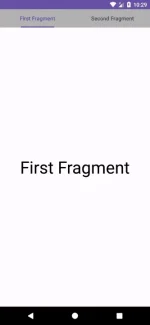
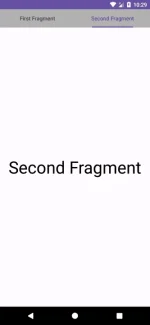
Screenshot_1686997780.webp
Screenshot_1686997783.webp


You do not have permission to view the full content of this post. Log in or register now.

Requirements:
  1. JDK 17 above
  2. Android 7 Nougat Above
  3. Android Studio Flamingo
 
Thank you for sharing this information about the Android Studio Tab Layout with Fragments!

TabLayout is a useful component in Android development that allows developers to easily create a user interface with tabs that can switch between different views or fragments. It's great to know that the TabLayout library you shared offers various customization options to control the appearance and behavior of the tabs, making it even more versatile and adaptable to different app designs.

Additionally, it's helpful that you included the requirements needed to use this library, such as JDK 17 above, Android 7 Nougat above, and Android Studio Flamingo. This will ensure that developers have the necessary tools to effectively use the TabLayout library in their app projects.

Overall, this is a great resource for developers who are looking to implement a tab layout in their Android app. Thank you for sharing it with the community!
 

About this Thread

  • 1
    Replies
  • 608
    Views
  • 1
    Participants
Last reply from:
Unknown user

Trending Topics

Online now

Members online
1,137
Guests online
1,283
Total visitors
2,420

Forum statistics

Threads
2,273,423
Posts
28,949,407
Members
1,235,742
Latest member
jiuyuan3213
Back
Top