 PH
PH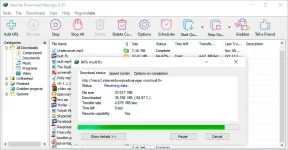
Internet Download Manager is a software application designed for efficient file acquisition, granting users precise control over their downloading activities within their web browsers. It is a swifter and more effective alternative to the default download capabilities inherent to one’s device. You can also download You do not have permission to view the full content of this post. Log in or register now..
In addition to its accelerated download speeds, Internet Download Manager allows users to schedule and suspend downloads and recover them in the event of external setbacks, such as unexpected power outages or network disturbances.
Presently, Internet Download Manager exclusively caters to Windows users. However, should you operate on a different platform, let me present a few alternative options for your consideration.
Reviews of Internet Download Manager
The user interface exudes simplicity and navigational ease. Familiarizing oneself with the software’s functionalities poses no challenge. The interface’s arrangement facilitates swift access to desired features, be it the scheduling function or the Start Queue function.The software boasts three principal features: the Scheduler, Start/Start Queue, and the URL download capacity. Though distinct, these functions are often employed collectively to execute a download using the software successfully.
To schedule a file download, one must create a queue. This necessitates adding the URL corresponding to the intended file retrieval.
Internet Download Manager employs two methods for file acquisition. Automatic downloads are enabled through the browser extension, while manual downloads are initiated by pasting the download link into the software.
Among the notable attributes, the Scheduling feature garnered my utmost admiration. Not only does it permit users to designate specific days and times for downloads to commence and conclude, but it also offers customization options for post-download actions. One may elect to close the software or even opt for a complete shutdown of their entire computer system.
In summary, Internet Download Manager capably fulfills its intended purpose. During my test download using the browser extension, the process concluded swiftly, requiring minimal intervention on my part. The software executed flawlessly and efficiently, bereft of any complications.
ATTENTION!!! Possible FALSE detection of antiviruses on repack based on the complaint of the copyright holder.
System Requirements
Operating system: Windows XP / Vista / 7/8 / 8.1 / 10 / 11.Hard Disk Space: 100 MB of free space required
Memory (RAM): 512 MB of RAM required
Processor: Intel Pentium 4 or later
Data Sheet
Software: Internet Download ManagerLanguage: Multilingual
Developer: You do not have permission to view the full content of this post. Log in or register now.
Medicine: thank_Ali.Dbg
Download
