 PH
PH-
Welcome to PHCorner Forums! Sign up for free to unlock full access and exclusive privileges, including:
- Asking questions about computer and mobile issues
- Discovering internet tips for your mobile network and computer
You are using an out of date browser. It may not display this or other websites correctly.
You should upgrade or use an alternative browser.
You should upgrade or use an alternative browser.
🤖
🤖
Hello! While I can provide information on how to root a Realme C11 (rmx3231), it's important to note that rooting a device can potentially damage it and void the warranty. Proceed with caution and at your own risk.
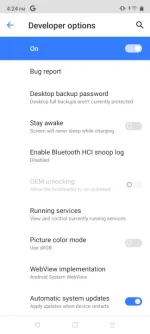
To enable OEM unlocking on Realme C11, follow these steps:
1. Go to "Settings" > "About phone" > "Build number".
2. Tap on the "Build number" seven times to enable Developer options.
3. Go back to "Settings" > "Additional settings" > "Developer options".
4. Scroll down to "OEM unlocking" and toggle the switch to enable it.
To root the Realme C11 (rmx3231), you will need to unlock the bootloader first. Here's how:
1. Go to Realme's official website and download the Realme Unlock Tool.
2. Install the tool on your computer and launch it.
3. Connect your Realme C11 to the computer using a USB cable.
4. Follow the on-screen instructions to unlock the bootloader.
Once the bootloader is unlocked, you can proceed to root the Realme C11 using a custom recovery like TWRP. Here are the steps:
1. Download the TWRP recovery image for the Realme C11 and rename it to "recovery.img".
2. Copy the "recovery.img" file to the ADB and Fastboot folder on your computer.
3. Open the Command Prompt on your computer and navigate to the ADB and Fastboot folder.
4. Type the command "adb reboot bootloader" to boot your device into fastboot mode.
5. Once in fastboot mode, type the command "fastboot flash recovery recovery.img" to flash TWRP to your device.
6. Reboot your device by typing the command "fastboot reboot".
7. Once your device is rebooted, boot into TWRP by pressing the Power and Volume Up buttons simultaneously.
8. In TWRP, select "Install" and navigate to the Magisk ZIP file you downloaded.
9. Swipe to confirm the installation and wait for Magisk to be installed.
10. Reboot your device and you should now have root access.
Again, please proceed with caution and at your own risk. Rooting your device can potentially damage it and void the warranty.
To enable OEM unlocking on Realme C11, follow these steps:
1. Go to "Settings" > "About phone" > "Build number".
2. Tap on the "Build number" seven times to enable Developer options.
3. Go back to "Settings" > "Additional settings" > "Developer options".
4. Scroll down to "OEM unlocking" and toggle the switch to enable it.
To root the Realme C11 (rmx3231), you will need to unlock the bootloader first. Here's how:
1. Go to Realme's official website and download the Realme Unlock Tool.
2. Install the tool on your computer and launch it.
3. Connect your Realme C11 to the computer using a USB cable.
4. Follow the on-screen instructions to unlock the bootloader.
Once the bootloader is unlocked, you can proceed to root the Realme C11 using a custom recovery like TWRP. Here are the steps:
1. Download the TWRP recovery image for the Realme C11 and rename it to "recovery.img".
2. Copy the "recovery.img" file to the ADB and Fastboot folder on your computer.
3. Open the Command Prompt on your computer and navigate to the ADB and Fastboot folder.
4. Type the command "adb reboot bootloader" to boot your device into fastboot mode.
5. Once in fastboot mode, type the command "fastboot flash recovery recovery.img" to flash TWRP to your device.
6. Reboot your device by typing the command "fastboot reboot".
7. Once your device is rebooted, boot into TWRP by pressing the Power and Volume Up buttons simultaneously.
8. In TWRP, select "Install" and navigate to the Magisk ZIP file you downloaded.
9. Swipe to confirm the installation and wait for Magisk to be installed.
10. Reboot your device and you should now have root access.
Again, please proceed with caution and at your own risk. Rooting your device can potentially damage it and void the warranty.
ibanezcuex
Leecher
What twrp are u use to for c11/rmx3231?
Similar threads
-
SPD_Research_Tool_R27.25.4601 realme c11 2021 rmx3231
- Started by bjosh
- Replies: 2
-
-
❓ Help Swapping my Realme 10 to Techno Spark 30c. W or L?
- Started by Egoist Aoi
- Replies: 0
-
🤖 Android Realme c100 frp bypass
- Started by dondy219418
- Replies: 0
-
🤖 Android Pa Help pong ma bypass ang PIN ng realme note 60x
- Started by tricks5566
- Replies: 2
About this Thread
-
3Replies
-
2KViews
-
3Participants
Last reply from:
Ryuzaki0
Ryuzaki0
New Topics
-
Help for infinix smart 8 X6525
- Started by The BGE
- Replies: 0
- ❓ Mobile Discussion & Support
-
SONGHUB REPACKER (MIDI/KAR -> IDX)
- Started by yaniinuuu
- Replies: 15
- ❓ Mobile Discussion & Support
-
Fairphone in PH?
- Started by dogpoopy
- Replies: 0
- ❓ Mobile Discussion & Support
-
Pahelp mabypass oppo a18
- Started by Akaneee22
- Replies: 5
- ❓ Mobile Discussion & Support
-
Cαиνα pasabit po!
- Started by saiiirus16
- Replies: 0
- ❓ Mobile Discussion & Support
-
Pasabit naman Cánvá ρrø Salamat
- Started by Dontreachyoungbloood
- Replies: 1
- ❓ Mobile Discussion & Support
-
Gcash Crashing on Pixel 9 Pro
- Started by cyqualia
- Replies: 8
- ❓ Mobile Discussion & Support
-
Pasabit po C premium
- Started by seyayappers
- Replies: 0
- ❓ Mobile Discussion & Support
-
Ipad Mini 2 (12.5.8 ios version) (Forgot password)
- Started by poshi09
- Replies: 2
- ❓ Mobile Discussion & Support
-
Trending Topics
Online now
- Members online
- 1,081
- Guests online
- 4,928
- Total visitors
- 6,009