PH
PHwArLoCk_1987
Fanatic
Paano ma fix to We can't sign into your account bigla nalang sya nag ganyan after ko buksan ang computer. pa help nmn sa nkaka alam, ngcheck na ako sa youtube pero after ko irestart ganon pdin ang lumalabas pag ng open n.
Thanks sir sana po gumana, i try ko po ngayon at feedback nalang po ako ulet.. salamat po ulet!Try following the procedure below, and check if the field to bypass password on login appears again in netplwiz.
1. Press Windows+R, type regedit and çlíçk OK;
2. Access the path below in the registry editor:
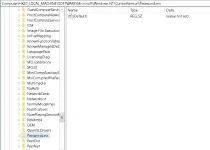
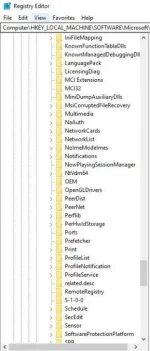
HKEY_LOCAL_MACHINE\SOFTWARE\Microsoft\Windows NT\CurrentVersion\PasswordLess\Device
3. Double-çlíçk DevicePasswordLessBuildVersion;
4. Set your value data to 0 and çlíçk OK.
5. Restart your computer.
Then access netplwiz again and check if the option appears.
1. Press Windows+R, type netplwiz and çlíçk OK;
2. Uncheck the "Users must enter a username and password to use this computer" box;
3. Confirm with "Apply" and then enter the password/confirmation of the current password and çlíçk "OK";
4. Restart the device and it will automatically log on.
sir HKEY_LOCAL_MACHINE\SOFTWARE\Microsoft\Windows NT\CurrentVersion hanggang jan lang nakita ko wala yung PasswordLess kaya jan plng hindi na ako mkpag continue.Try following the procedure below, and check if the field to bypass password on login appears again in netplwiz.
1. Press Windows+R, type regedit and çlíçk OK;
2. Access the path below in the registry editor:
HKEY_LOCAL_MACHINE\SOFTWARE\Microsoft\Windows NT\CurrentVersion\PasswordLess\Device
3. Double-çlíçk DevicePasswordLessBuildVersion;
4. Set your value data to 0 and çlíçk OK.
5. Restart your computer.
Then access netplwiz again and check if the option appears.
1. Press Windows+R, type netplwiz and çlíçk OK;
2. Uncheck the "Users must enter a username and password to use this computer" box;
3. Confirm with "Apply" and then enter the password/confirmation of the current password and çlíçk "OK";
4. Restart the device and it will automatically log on.
yes sir windows 10.
sige sir try ko yan, kapag ayaw eh format lang tlga cguro makakasagot. Salamat sir sa timenako idol. hindi ko na po alam. need mo na ng usb dyan
bootable win 10