 PH
PH-
Welcome to PHCorner Forums! Sign up for free to unlock full access and exclusive privileges, including:
- Asking questions about computer and mobile issues
- Discovering internet tips for your mobile network and computer
You are using an out of date browser. It may not display this or other websites correctly.
You should upgrade or use an alternative browser.
You should upgrade or use an alternative browser.
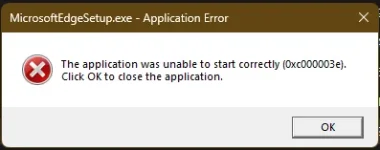
❓ Help CANT UPDATE/REINSTALL MICROSOFT EDGE
- Thread starter itszayn00
- Start date
- Status
- Not open for further replies.
🤖
🤖
Oo, marami na ang nakaranas ng error na ito sa pag-uupdate o pag-reinstall ng Microsoft Edge sa Windows 11. Narito ang ilang mga posibleng solusyon upang malutas ang issue:
1. I-clear ang cache ng Microsoft Edge - Pumunta sa Settings> Privacy and Security> Clear browsing data> Piliin ang Cached images and files> I-click ang Clear data button.
2. I-uninstall at i-reinstall ang Microsoft Edge - Pumunta sa Settings> Apps> Apps and features> Pumili ng Microsoft Edge> I-click ang Uninstall button> Pagkatapos ay i-reinstall ang Edge gamit ang official website ng Microsoft.
3. Gamitin ang Windows PowerShell - Pumunta sa Start menu> I-type ang PowerShell sa search box> I-click ang Run as administrator> I-type ang Get-AppXPackage -AllUsers -Name Microsoft.MicrosoftEdge | Foreach {Add-AppxPackage -DisableDevelopmentMode -Register "$($_.InstallLocation)\AppXManifest.xml" -Verbose} sa PowerShell window> I-press ang Enter key.
Kung hindi pa rin gumagana ang mga solusyon na ito, maaaring magpakonsulta sa Microsoft Support upang masolusyunan ang issue.
1. I-clear ang cache ng Microsoft Edge - Pumunta sa Settings> Privacy and Security> Clear browsing data> Piliin ang Cached images and files> I-click ang Clear data button.
2. I-uninstall at i-reinstall ang Microsoft Edge - Pumunta sa Settings> Apps> Apps and features> Pumili ng Microsoft Edge> I-click ang Uninstall button> Pagkatapos ay i-reinstall ang Edge gamit ang official website ng Microsoft.
3. Gamitin ang Windows PowerShell - Pumunta sa Start menu> I-type ang PowerShell sa search box> I-click ang Run as administrator> I-type ang Get-AppXPackage -AllUsers -Name Microsoft.MicrosoftEdge | Foreach {Add-AppxPackage -DisableDevelopmentMode -Register "$($_.InstallLocation)\AppXManifest.xml" -Verbose} sa PowerShell window> I-press ang Enter key.
Kung hindi pa rin gumagana ang mga solusyon na ito, maaaring magpakonsulta sa Microsoft Support upang masolusyunan ang issue.
- Status
- Not open for further replies.
About this Thread
-
1Replies
-
546Views
-
1Participants
Last reply from:
Unknown user
Unknown user
New Topics
-
Windows 11 26H2
- Started by tholitz
- Replies: 0
- ❓ Computer Discussion & Support
-
Help po !!!! My account got häçked Facebook and steam
- Started by bujoy20
- Replies: 6
- ❓ Computer Discussion & Support
-
Replace laptop lcd
- Started by toki07
- Replies: 0
- ❓ Computer Discussion & Support
-
Mga bossing patulong po nahäçk account ko due to carelessness
- Started by Jeii
- Replies: 2
- ❓ Computer Discussion & Support
-
Computer parts na cheap
- Started by bjenjay1
- Replies: 1
- ❓ Computer Discussion & Support
-
PC APPS - remote or auto saved type and auto audio
- Started by babyzero
- Replies: 0
- ❓ Computer Discussion & Support
-
Data Recovery May Chance pa bato
- Started by tambay28
- Replies: 0
- ❓ Computer Discussion & Support
-
Capcut PC pasabit po
- Started by L A Z A
- Replies: 0
- ❓ Computer Discussion & Support
-
Download Youtube Video using CMD
- Started by BeerGin69
- Replies: 1
- ❓ Computer Discussion & Support
-
Taiwebs alternative websites
- Started by gigsta
- Replies: 0
- ❓ Computer Discussion & Support
Trending Topics
Online now
- Members online
- 1,124
- Guests online
- 4,517
- Total visitors
- 5,641