View attachment How to Turn On_Off VoLTE Calls - Oppo [Android 11 - ColorOS 11].mp4
Step 1: Download the DITO app
The first thing you have to do is to download and install the DITO app from
You do not have permission to view the full content of this post.
Log in or register now. or the
You do not have permission to view the full content of this post.
Log in or register now.. You can use your WiFi connection or mobile data from another network.
The DITO mobile app is your gateway to all DITO services, allowing you to buy load, check your balances, register to promos, share load or data, contact customer support, and many more.
Step 2: Insert the DITO SIM
Using the free SIM ejector pin, insert the DITO SIM on your mobile device’s SIM slot. If your phone is dual SIM, insert the DITO SIM into the SIM 1 slot only.
Step 3: Turn on VoLTE
Next is to turn on Voice over LTE (VoLTE), a technology that allows you to make clearer calls over modern LTE networks like DITO. Follow these steps to enable VoLTE for your mobile device (the steps may differ depending on your phone):
- Turn on mobile data.
- Go to Settings and click Connections.
- Choose Mobile Networks.
- Locate and turn on VoLTE Calls.
- If successful, you will see the VoLTE icon on the status bar.
If you can’t locate VoLTE using the steps above, the option might be found in
Cellular Network,
Call or
Call Settings (or something similar). You can also try searching for “VoLTE” or “Voice over LTE” in Settings.
Step 4: Change APN Settings
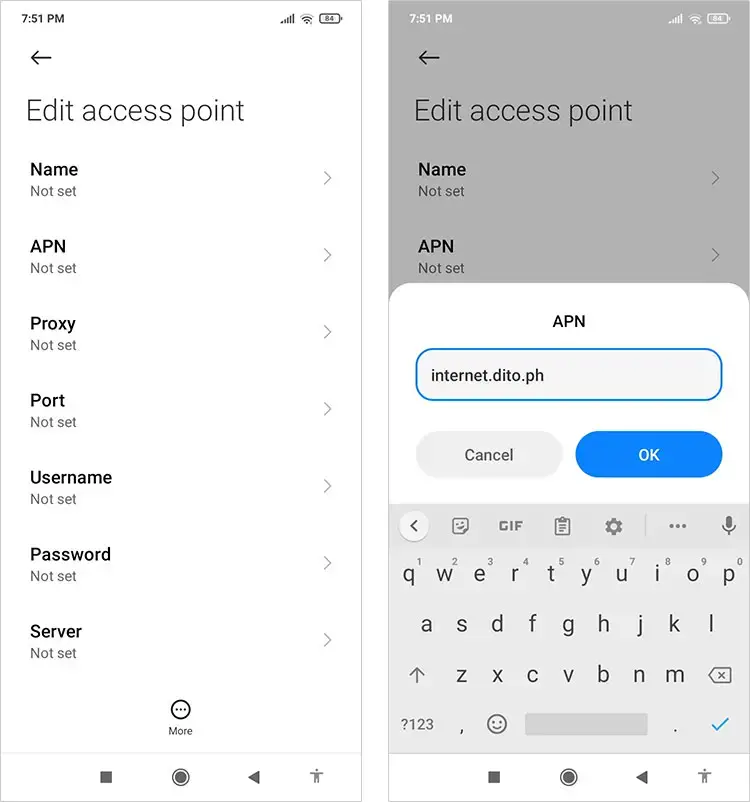
If you still can’t access the data service after turning on VoLTE, you will have to change your APN settings. APN stands for Access Point Name and is the gateway between a mobile network and another network.
Follow these steps to edit the DITO APN settings (the steps might differ depending on your phone):
- Go to Settings and click Connections.
- Select Mobile Networks.
- Choose Access Point Names.
- Click the Add button and type internet.dito.ph in the APN field. Click OK to save.
- Turn on mobile data (if you haven’t done so already) and wait for the welcome message.
You will receive a welcome text message from DITO that contains a link to download the DITO app and your initial login password.
Step 5: Log in to the DITO app
Open the DITO app. Click
“Sign in with your DITO number” and login using the initial password included in the welcome message.
Pa mark as solution na rin sakaling gumana
 PH
PH