 PH
PH-
Welcome to PHCorner Forums! Sign up for free to unlock full access and exclusive privileges, including:
- Asking questions about computer and mobile issues
- Discovering internet tips for your mobile network and computer
You are using an out of date browser. It may not display this or other websites correctly.
You should upgrade or use an alternative browser.
You should upgrade or use an alternative browser.
❓ Help How to hide comment
🤖
🤖
To hide a comment on most online platforms, you can usually click on the three dots or the gear icon next to the comment, and then select "Hide" or "Delete" from the menu options. However, each platform may have its own specific steps for hiding comments.
On Facebook, for example, you can hide a comment by clicking on the three dots next to the comment and selecting "Hide comment". This will hide the comment from the public, but the person who posted the comment can still see it.
On YouTube, you can hide a comment by clicking on the three dots next to the comment and selecting "Hide user from channel". This will hide all comments from that user on your channel.
On Instagram, you can hide a comment by swiping left on the comment and selecting the exclamation point icon. From there, you can select "Hide Comment" or "Delete Comment".
It's important to note that hiding a comment does not necessarily delete it permanently. The person who posted the comment can still see it and it may still be visible to others depending on their privacy settings.
On Facebook, for example, you can hide a comment by clicking on the three dots next to the comment and selecting "Hide comment". This will hide the comment from the public, but the person who posted the comment can still see it.
On YouTube, you can hide a comment by clicking on the three dots next to the comment and selecting "Hide user from channel". This will hide all comments from that user on your channel.
On Instagram, you can hide a comment by swiping left on the comment and selecting the exclamation point icon. From there, you can select "Hide Comment" or "Delete Comment".
It's important to note that hiding a comment does not necessarily delete it permanently. The person who posted the comment can still see it and it may still be visible to others depending on their privacy settings.
PHC_Regurusu
Forum Guru
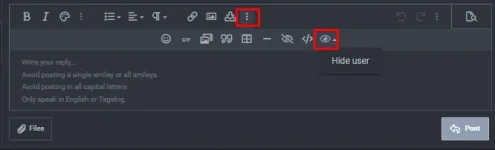
Then iindicate mo sa taas if kanino mo lang ipapakita yung comment, then sa baba naman yung mismong message mo sa kanya gets?
kyutkopromise
Established
Thanks papsView attachment 2642916
Then iindicate mo sa taas if kanino mo lang ipapakita yung comment, then sa baba naman yung mismong message mo sa kanya gets?
noznozomi_
Fanatic
ty poView attachment 2642916
Then iindicate mo sa taas if kanino mo lang ipapakita yung comment, then sa baba naman yung mismong message mo sa kanya gets?
Exclamation
Fanatic
You do not have permission to view the full content of this post. Log in or register now.
PHC_Regurusu
Forum Guru
Nice try paps haha[Hidden content]
Vann_Elric
Forum Veteran
Ayaw gumana sakin ahView attachment 2642916
Then iindicate mo sa taas if kanino mo lang ipapakita yung comment, then sa baba naman yung mismong message mo sa kanya gets?
Vann_Elric
Forum Veteran
You do not have permission to view the full content of this post. Log in or register now.
Thank you[Hidden content]
JaysonRare
Honorary Poster
You do not have permission to view the full content of this post. Log in or register now.
PHC - 3PaBuLong2
Forum Veteran
You do not have permission to view the full content of this post. Log in or register now.
ForbiddenLink
Forum Veteran
View attachment 2642916
Then iindicate mo sa taas if kanino mo lang ipapakita yung comment, then sa baba naman yung mismong message mo sa kanya gets?
Waterlookingcrazy
Leecher
You do not have permission to view the full content of this post. Log in or register now.
Similar threads
About this Thread
-
21Replies
-
3KViews
-
19Participants
Last reply from:
Fraehl
Fraehl
New Topics
-
Facebook account permanently disabled
- Started by Shuji
- Replies: 2
- 💬 Chitchat
-
Any recommend VPN? ρáíd or Free
- Started by kim4you
- Replies: 4
- 💬 Chitchat
-
Wala nabang paypal payment ᑕᕼᗩTGᑭT?
- Started by shado
- Replies: 5
- 💬 Chitchat
-
Anong PC ang maganda na pang edit ng Videos
- Started by Hypermood15
- Replies: 1
- 💬 Chitchat
-
Mga bossing baka pwede makisabit ng vpn nyo pang android salamat ng marami.
- Started by guabrex
- Replies: 1
- 💬 Chitchat
-
Pa help po sa pag create ng apple ID willing to pay
- Started by harveyhayo
- Replies: 3
- 💬 Chitchat
-
Happy Birthday Daw Sakin sabi sa PHC
- Started by Damn-YankeeS
- Replies: 5
- 💬 Chitchat
-
Helping SharePost (Educational Purpose)
- Started by rainych_ran
- Replies: 2
- 💬 Chitchat
-
Huactrl ayaw gumana
- Started by duwan4476
- Replies: 0
- 💬 Chitchat
Trending Topics
Online now
- Members online
- 648
- Guests online
- 4,027
- Total visitors
- 4,675