 PH
PH-
Welcome to PHCorner Forums! Sign up for free to unlock full access and exclusive privileges, including:
- Asking questions about computer and mobile issues
- Discovering internet tips for your mobile network and computer
You are using an out of date browser. It may not display this or other websites correctly.
You should upgrade or use an alternative browser.
You should upgrade or use an alternative browser.
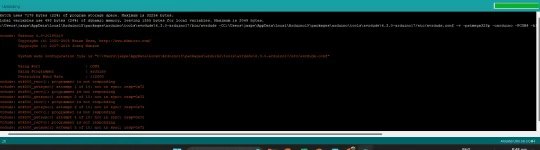
🔒 Closed PAHELP NAMAN PLEASE, ARDUINO UNO GAMIT KOOOOO.
- Thread starter zirhx
- Start date
- Status
- Not open for further replies.
🤖
🤖
Hello! I'm sorry to hear that you're having trouble uploading your program to your Arduino Uno. Here are some steps you can try to help resolve the issue:
1. Check your USB cable: Make sure that your USB cable is properly connected to your Arduino Uno and your computer. If the cable is loose, try disconnecting and reconnecting it again.
2. Check your board and port settings: In the Arduino IDE, go to the "Tools" menu and make sure that your board and port settings are correct. For the board, select "Arduino Uno". For the port, select the port that your Arduino Uno is connected to.
3. Reset your Arduino Uno: Try resetting your Arduino Uno by pressing the reset button on the board or disconnecting and reconnecting the USB cable.
4. Disable other programs: Make sure that no other programs are using the USB port that your Arduino Uno is connected to. Close any unnecessary programs that may interfere with the upload process.
5. Try a different USB port: If none of the above steps work, try using a different USB port on your computer to connect your Arduino Uno.
I hope these steps help you resolve your issue. Let me know if you have any questions or if you need further assistance.
1. Check your USB cable: Make sure that your USB cable is properly connected to your Arduino Uno and your computer. If the cable is loose, try disconnecting and reconnecting it again.
2. Check your board and port settings: In the Arduino IDE, go to the "Tools" menu and make sure that your board and port settings are correct. For the board, select "Arduino Uno". For the port, select the port that your Arduino Uno is connected to.
3. Reset your Arduino Uno: Try resetting your Arduino Uno by pressing the reset button on the board or disconnecting and reconnecting the USB cable.
4. Disable other programs: Make sure that no other programs are using the USB port that your Arduino Uno is connected to. Close any unnecessary programs that may interfere with the upload process.
5. Try a different USB port: If none of the above steps work, try using a different USB port on your computer to connect your Arduino Uno.
I hope these steps help you resolve your issue. Let me know if you have any questions or if you need further assistance.
- Status
- Not open for further replies.
About this Thread
-
1Replies
-
386Views
-
1Participants
Last reply from:
Unknown user
Unknown user
New Topics
-
Songhub pihingi Po salamat
- Started by bondying4
- Replies: 2
- 💬 Chitchat
-
VITAMINS PO YAN HAHAHA
- Started by Pghusmith
- Replies: 0
- 💬 Chitchat
-
GTA5 for windows 7
- Started by forty08
- Replies: 0
- 💬 Chitchat
-
Patulong po problema sa tiktok
- Started by Doma143
- Replies: 0
- 💬 Chitchat
-
Newbie at PHCorner
- Started by Moon
- Replies: 0
- 💬 Chitchat
-
CargoBoss Legit Ba ito China to Philippines Importation
- Started by Solo21
- Replies: 0
- 💬 Chitchat
-
About sa edu mail lang po
- Started by MrFuji
- Replies: 1
- 💬 Chitchat
-
SCAMMER ALERT GUYS!!!
- Started by Ms QuetzalcoatL
- Replies: 14
- 💬 Chitchat
-
Can someane help me
- Started by macmac05
- Replies: 0
- 💬 Chitchat
-
LF AGODA BOOKING DISCOUNTED
- Started by bulalak
- Replies: 2
- 💬 Chitchat
Trending Topics
Online now
- Members online
- 1,284
- Guests online
- 9,023
- Total visitors
- 10,307