 PH
PHMedyo mahina ba computer mo??
Try mo to. Ito tweaks ko lalo na sa Pesonet Units ko para kunti lang ang load sa memory at faster boot.
Pinagsama sama ko mga nakita kung good tweaks at nagibento.
Wag kaayon maniwal sa mga tweaker na software tuneup utilities at iba pa. It still add sa load ng system ninyo. Pagsinabayan ng ibang programs or games lag parin yan.
Before ninyo gawin ito punta kay task manager at click performance.
Tignan ninyo ang load ng Memory before and after the tweak ))
))
Sa akin normal load 1.2gb memo after tweak 700+mb nalang
Tirahin muna natin una ang Windows
1. Rigth click Computer either sa Desktop or sa may start makikita.
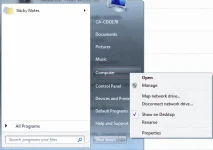
2. Click properties
3. Click advance system settings
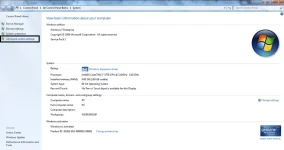
4. Under system advance click Advance
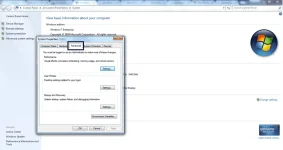
5. click settings
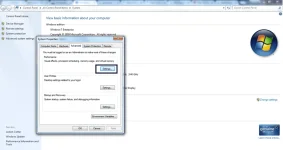
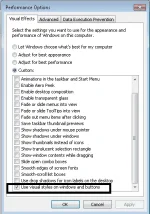
6. Only check use visual styles on windows and buttons
Next Step na tayo mga tsong!
Download muna ng CCleaner.
Ok na site You do not have permission to view the full content of this post. Log in or register now. madami magaganda free softwares dito na libre. Explore2x nalang
CCleaner Link: You do not have permission to view the full content of this post. Log in or register now.
Sa tagal ko gamit CCleaner tsaka ko pa na notice may maganda features na makatulong para speed up pc natin.
1. Open CCleaner tapos click Run Cleaner
2. Punta ka sa Tools "menu bar sa may left side"
3. click startup [Windows] "dito makikita ano niloload ng pc mo pagka bukas" Usually dami useless dito kaya need to disable all
4. click isa tapos ctrl + A and then disable mo.
5. under startup [click schedule task] Wala ako mahanap na tools dito except CCleaner.
6. check yung advance para lumabas lahat at ctrl + A again para lahat ma shade else pwede isa isa.
7. Disable ninyo lahat except may isa dyan mag eerror "C" nag start yung title pabayaan nyo na at hindi talaga ma disable yan.
8. under startup [click context menu]
9. click isa tapos ctrl + A para lahat ma shade at e disable din
10. Click Browsers Plugin
Lahat dyan e disable din ninyo para bumilis mga browsers ninyo
3rd Tweak:
1. Go to task manager
2. Services
3. Click Services sa bottom right
4. Disable:
a. Offline Folder
b. Printer Spooler
c. Windows Update
d. Windows Search
e. Windows Defender
f. Software Protection
paano e disable simply lang e right click > properties > Ang startup type naka Automatic set ninyo to disable
Lastly
1. run
2. type msconfig
3. click boot
4. advance options
5. check number of proce tapos select yung max na proce mo
6. check max memory. select mo max memory mo
7. Click Apply and restart
BOOM! natapos din!!
likers nalang kung effective ; )
Try mo to. Ito tweaks ko lalo na sa Pesonet Units ko para kunti lang ang load sa memory at faster boot.
Pinagsama sama ko mga nakita kung good tweaks at nagibento.
Wag kaayon maniwal sa mga tweaker na software tuneup utilities at iba pa. It still add sa load ng system ninyo. Pagsinabayan ng ibang programs or games lag parin yan.
Before ninyo gawin ito punta kay task manager at click performance.
Tignan ninyo ang load ng Memory before and after the tweak
))Sa akin normal load 1.2gb memo after tweak 700+mb nalang
Tirahin muna natin una ang Windows
1. Rigth click Computer either sa Desktop or sa may start makikita.
2. Click properties
3. Click advance system settings
4. Under system advance click Advance
5. click settings
6. Only check use visual styles on windows and buttons
Next Step na tayo mga tsong!
Download muna ng CCleaner.
Ok na site You do not have permission to view the full content of this post. Log in or register now. madami magaganda free softwares dito na libre. Explore2x nalang
CCleaner Link: You do not have permission to view the full content of this post. Log in or register now.
Sa tagal ko gamit CCleaner tsaka ko pa na notice may maganda features na makatulong para speed up pc natin.
1. Open CCleaner tapos click Run Cleaner
2. Punta ka sa Tools "menu bar sa may left side"
3. click startup [Windows] "dito makikita ano niloload ng pc mo pagka bukas" Usually dami useless dito kaya need to disable all
4. click isa tapos ctrl + A and then disable mo.
5. under startup [click schedule task] Wala ako mahanap na tools dito except CCleaner.
6. check yung advance para lumabas lahat at ctrl + A again para lahat ma shade else pwede isa isa.
7. Disable ninyo lahat except may isa dyan mag eerror "C" nag start yung title pabayaan nyo na at hindi talaga ma disable yan.
8. under startup [click context menu]
9. click isa tapos ctrl + A para lahat ma shade at e disable din
10. Click Browsers Plugin
Lahat dyan e disable din ninyo para bumilis mga browsers ninyo
3rd Tweak:
1. Go to task manager
2. Services
3. Click Services sa bottom right
4. Disable:
a. Offline Folder
b. Printer Spooler
c. Windows Update
d. Windows Search
e. Windows Defender
f. Software Protection
paano e disable simply lang e right click > properties > Ang startup type naka Automatic set ninyo to disable
Lastly
1. run
2. type msconfig
3. click boot
4. advance options
5. check number of proce tapos select yung max na proce mo
6. check max memory. select mo max memory mo
7. Click Apply and restart
BOOM! natapos din!!
likers nalang kung effective ; )