 PH
PHGood morning PHC, just want to share how I successfully installed Tidal (or any apps that are not available in our country)
There's no need to install or download vpn as app store can detect which country you are based on from your iCloud account.
Thanks to PHC daeliciousKat, nakasabit ako Tidal sa giveaways niya. (Follow her/him and check their postings)
If you're using an IPhone that is bypassed or can't do resets, change iCloud, then this trick won't do for you.
Click here
Step1: Open this link to get the fake address for Australia location, (I used Australia because Tidal is available in that country, you can use any basta pasok yung application na gusto niyong iinstall sa appstore)
You do not have permission to view the full content of this post. Log in or register now.
Step2: Sign out your current iCloud account. (If you have saved passwords from Safari I suggest to toggle the checkboxes for backing up data)
Again, this method shouldn't be done by iPhone users who have a bypassed account or can't do resets.
Step3: Create your new iCloud account, complete all the requirements in creating an account such as Phone number verification.
Step4: Once the new account is created, go to App store.
Step5: Sign in with your new iCloud acc by entering your password.
Step 6: Click your profile in the app store (Upper right corner)
Follow the rest:
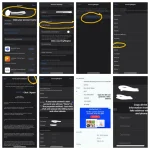
Last step: Search for Tidal, click get or install. You will be notified by app store to agree on their terms first, just agree on it and then right after you can now proceed on your installation.
Just copy all the information you got from the fake address generator.
PS: Wag mo na itry yung mga credit info, di nagana yan, triny ko eh HAHAHA!
Anyway, after niyo ma-install, you can just go sign out this new account that you created and i-login mo na ulit original account mo. Now you can enjoy your desired app without any problems!
There's no need to install or download vpn as app store can detect which country you are based on from your iCloud account.
Thanks to PHC daeliciousKat, nakasabit ako Tidal sa giveaways niya. (Follow her/him and check their postings)
If you're using an IPhone that is bypassed or can't do resets, change iCloud, then this trick won't do for you.
Click here
Step1: Open this link to get the fake address for Australia location, (I used Australia because Tidal is available in that country, you can use any basta pasok yung application na gusto niyong iinstall sa appstore)
You do not have permission to view the full content of this post. Log in or register now.
Step2: Sign out your current iCloud account. (If you have saved passwords from Safari I suggest to toggle the checkboxes for backing up data)
Again, this method shouldn't be done by iPhone users who have a bypassed account or can't do resets.
Step3: Create your new iCloud account, complete all the requirements in creating an account such as Phone number verification.
Step4: Once the new account is created, go to App store.
Step5: Sign in with your new iCloud acc by entering your password.
Step 6: Click your profile in the app store (Upper right corner)
Follow the rest:
Last step: Search for Tidal, click get or install. You will be notified by app store to agree on their terms first, just agree on it and then right after you can now proceed on your installation.
Just copy all the information you got from the fake address generator.
PS: Wag mo na itry yung mga credit info, di nagana yan, triny ko eh HAHAHA!
Anyway, after niyo ma-install, you can just go sign out this new account that you created and i-login mo na ulit original account mo. Now you can enjoy your desired app without any problems!
 ganun pala yun.. cge bibili muna ako iphone TS hahahaha


