 PH
PH-
Welcome to PHCorner Forums! Sign up for free to unlock full access and exclusive privileges, including:
- Asking questions about computer and mobile issues
- Discovering internet tips for your mobile network and computer
You are using an out of date browser. It may not display this or other websites correctly.
You should upgrade or use an alternative browser.
You should upgrade or use an alternative browser.
🗄️ Databases Help firebase
- Thread starter PHC_Shion
- Start date
🤖
🤖
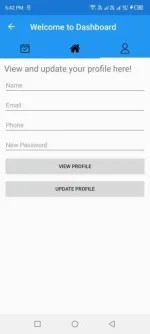
To retrieve the current user information using Firebase 3.7.2 and C# in Xamarin Forms, you can use the following steps:
1. First, create an instance of Firebase Authentication in your project by adding the Firebase Authentication NuGet package to your project.
2. Then, initialize the Firebase app in your code by calling the
3. To retrieve the current user information, call the
4. You can then access various properties of the
Here is an example code snippet that demonstrates how to retrieve the current user information using Firebase Authentication in C# Xamarin Forms:
Make sure to replace
1. First, create an instance of Firebase Authentication in your project by adding the Firebase Authentication NuGet package to your project.
2. Then, initialize the Firebase app in your code by calling the
FirebaseApp.InitializeApp method and passing in your Firebase configuration.3. To retrieve the current user information, call the
FirebaseAuth.Instance.CurrentUser property, which returns a FirebaseUser object representing the current user.4. You can then access various properties of the
FirebaseUser object to get information about the current user, such as Uid, Email, DisplayName, etc.Here is an example code snippet that demonstrates how to retrieve the current user information using Firebase Authentication in C# Xamarin Forms:
Code:
using Firebase.Auth;

// Initialize Firebase app
var config = new FirebaseConfig("<your-firebase-config>");
FirebaseApp.InitializeApp(config);

// Retrieve current user information
FirebaseUser currentUser = FirebaseAuth.Instance.CurrentUser;
if (currentUser != null) {
    // User is signed in
    string uid = currentUser.Uid;
    string email = currentUser.Email;
    string displayName = currentUser.DisplayName;
    // ...
} else {
    // No user is signed in
}
Make sure to replace
<your-firebase-config> with your own Firebase configuration.MrDeezrizzpect
Fanatic
Bruv ask ko lang if naexplore mo na flutterflow, you might check it. Been using it for App dev. It uses Dart language (flutter) and firebase connection.
Wala pa po kasi idea dyan, nagpractice palang po ditoBruv ask ko lang if naexplore mo na flutterflow, you might check it. Been using it for App dev. It uses Dart language (flutter) and firebase connection.
MrDeezrizzpect
Fanatic
Siguro mas okay nayan na hardcoded paggawa mo ng app. In Flutterflow kase basically its just drag and drop na. And complete na sourcecode doon once you finished. May access karin sa sourcecode etc.Wala pa po kasi idea dyan, nagpractice palang po dito
But since you’ve already created your UI firebase setup nalang kulang mo and CRUD. Medyo maproseso manual retrieval kay firebase but there’s a lot of tuts in yt or from stacksoverflow. Goodluck sayo TS, I’m also currently working on app dev now.
PHC-PatRach28
Honorary Poster
idol pwede pala C# sa mobile app development?
PHC - ShadowX
Forum Guru
Nag enroll Ako dyan flutterflow sa udemy nag bayad Ako ..
Similar threads
-
Angular AI: Generative AI Apps with Gemini, Genkit, Firebase
- Started by webrtc
- Replies: 0
-
[UDACITY] Learn Firebase | Firebase in a Weekend: iOS | Udacity
- Started by flex012
- Replies: 0
-
[UDACITY] Firebase for Android | Firebase in a Weekend | Udacity
- Started by flex012
- Replies: 1
-
Flutter &; Firebase: build an E-commerce and Admin App[2024]
- Started by abbesala
- Replies: 0
-
About this Thread
-
6Replies
-
678Views
-
4Participants
Last reply from:
PHC - ShadowX
PHC - ShadowX
New Topics
-
How to be a computer programmer what to learn first??
- Started by No liabilities
- Replies: 1
- 💻 Coding & Programming
-
Any Simple but Useful App Ideas to Develop?
- Started by tnt546
- Replies: 2
- 💻 Coding & Programming
-
Test your app now if vulnerable ka sa php2shell
- Started by Ace Valentine
- Replies: 2
- 💻 Coding & Programming
-
Naka-Node.js ka? Update to 22.23.4 / 24.22.1 / 26.12.1 (Security Fix)
- Started by 4 0 4
- Replies: 2
- 💻 Coding & Programming
-
Peddlr Kankolek API - please help
- Started by nesty24
- Replies: 0
- 💻 Coding & Programming
-
Cryst@l R3port Designer
- Started by Porky Chao Fan
- Replies: 0
- 💻 Coding & Programming
-
-
Nag-fail ang Backup Pero Di Mo Alam? Try Boop (Self-Hosted Alerts)
- Started by 4 0 4
- Replies: 2
- 💻 Coding & Programming
-
Looking ako na marunong gumawa ng auto login and claim rewards
- Started by AdoboKid
- Replies: 6
- 💻 Coding & Programming
-
Trending Topics
Online now
- Members online
- 547
- Guests online
- 7,401
- Total visitors
- 7,948