❓ Help Flash Drive Unable to Format

Status
Not open for further replies.

Dapsone

Forum Guru
Help!

Di ko maformat yung Flash Drive ko.


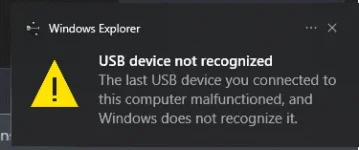
Ginamitan ko na ng Yt tutorial, CMD, Minitool pero after ma Format or Delete Volume. USB not recognized naman yung lumalabas. Tapos pagkasalpak naman is bumabalik siya sa dati. Hindi naman na Format and also Not detected siya sa PC.

Nagsimula to nung nag USB bootable ako tapos nag error habang nag boot ako.

Sana matulungan. Thank you in Advance.



1682250052748.webp

1682250087857.webp

1682250235088.webp
 
Solution
🤖
Hi there! I'm sorry to hear that you're having trouble formatting your flash drive. There are a few things that you can try to fix the issue:

1. Check if the flash drive is write-protected. Sometimes, flash drives have a switch on the side that can be toggled to enable or disable write protection. If this switch is on, you won't be able to format the drive.

2. Try formatting the drive using a different computer. It's possible that your computer's USB port is malfunctioning, which is preventing the drive from being formatted. Try plugging the drive into another computer and see if you're able to format it there.

3. Use a different formatting tool. If you've already tried using the built-in Windows formatting tool and other third-party...
Hi there! I'm sorry to hear that you're having trouble formatting your flash drive. There are a few things that you can try to fix the issue:

1. Check if the flash drive is write-protected. Sometimes, flash drives have a switch on the side that can be toggled to enable or disable write protection. If this switch is on, you won't be able to format the drive.

2. Try formatting the drive using a different computer. It's possible that your computer's USB port is malfunctioning, which is preventing the drive from being formatted. Try plugging the drive into another computer and see if you're able to format it there.

3. Use a different formatting tool. If you've already tried using the built-in Windows formatting tool and other third-party formatting tools, you may want to try using a different one. Rufus is one popular option that you can download for free online.

4. Use a partition manager tool. Sometimes, a flash drive can have hidden partitions or other issues that prevent it from being formatted. A partition manager tool like AOMEI Partition Assistant or EaseUS Partition Master can help you delete these partitions and format the drive.

If none of these solutions work, it's possible that your flash drive is damaged or defective. In that case, you may need to replace it. I hope this helps!
 
Solution
Ganyan din flash drive ko dati, di ko alam kung ung components naba sa loob ung sira, di rin nafoformat.
Nararamdaman ko may chance pa to. Di ko lang alam talaga pano yung trick. Hahaha 😂

Hi there! I'm sorry to hear that you're having trouble formatting your flash drive. There are a few things that you can try to fix the issue:

1. Check if the flash drive is write-protected. Sometimes, flash drives have a switch on the side that can be toggled to enable or disable write protection. If this switch is on, you won't be able to format the drive.

2. Try formatting the drive using a different computer. It's possible that your computer's USB port is malfunctioning, which is preventing the drive from being formatted. Try plugging the drive into another computer and see if you're able to format it there.

3. Use a different formatting tool. If you've already tried using the built-in Windows formatting tool and other third-party formatting tools, you may want to try using a different one. Rufus is one popular option that you can download for free online.

4. Use a partition manager tool. Sometimes, a flash drive can have hidden partitions or other issues that prevent it from being formatted. A partition manager tool like AOMEI Partition Assistant or EaseUS Partition Master can help you delete these partitions and format the drive.

If none of these solutions work, it's possible that your flash drive is damaged or defective. In that case, you may need to replace it. I hope this helps!
Thank you. I'll try another pc. And another method
 
Status
Not open for further replies.

About this Thread

  • 5
    Replies
  • 686
    Views
  • 4
    Participants
Last reply from:
Jck-Frost

Trending Topics

Online now

Members online
994
Guests online
1,224
Total visitors
2,218

Forum statistics

Threads
2,273,520
Posts
28,950,121
Members
1,235,795
Latest member
cardodalisay0702
Back
Top