👨‍🏫 Tutorial NextDNS Pro (Block ADS like Facebook Video | Loklok & browser)

Status
Not open for further replies.

Oranek

Forum Contributor
Contributor

RECOMMENDED

Private DNS


Android 9 or higher

1. Go to Settings → Network & internet → Advanced → Private DNS.

2. Select the Private DNS provider hostname option.

3. Enter WALA NA and hit Save.

— — —

RECOMMENDED

Configuration Profile
iOS 14 or higher


Use our Apple Configuration Profile Generator available at apple.nextdns.io.


*PROFILE: WALA NA
*Device Name: ex. "iPhone 14"
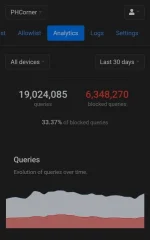


IMG_20230524_212123.jpg

NextDNS protects you from all kinds of security threats, blocks ads and trackers on websites and in apps and provides a safe and supervised Internet for kids — on all devices and on all networks.

— — — — —

Retention:
*1 Year

Storage Location:
*Switzerland


Can I block YøùTùbé ads with NextDNS only?
No
, you cannot block first-party ads using only DNS-level blocking. You will need an adblocker.
 
Di naman nakakablock ng sim yan lods?
same yan din sana tanong ko
Hindi, DNS lang naman Yan... Hindi Yan VPN

Safe ba ito lodi
Yes

Thank for sharing master...
salamat idol. unli scroll na ata sa fb hahhaha
Eto hinahanp ko matagal na sa adsguard kase ayaw
Maganda to. Hayp na mga ads sa fb yan laging sugal at kăsïno. Bull shhht. 😂
thank you so much sir haha wala na makulit na ads sa fb 😁👍
Welcome mga lodi
 
Status
Not open for further replies.

About this Thread

  • 57
    Replies
  • 2K
    Views
  • 39
    Participants
Last reply from:
Nidavellir

Trending Topics

Online now

Members online
1,266
Guests online
3,975
Total visitors
5,241

Forum statistics

Threads
2,325,908
Posts
29,225,398
Members
1,167,694
Latest member
Kda2k
Back
Top