🔒 Closed The Smiths Heaven Knows I'm Miserable Now

Status
Not open for further replies.
1680740459777.webp

I was happy in the haze of a drunken hour
But heaven knows I'm miserable now
I was looking for a job, and then I found a job
And heaven knows I'm miserable now
In my life
Why do I give valuable time
To people who don't care if I live or die?
Two lovers entwined pass me by
And heaven knows I'm miserable now
I was looking for a job, and then I found a job
And heaven knows I'm miserable now
In my life
Oh, why do I give valuable time
To people who don't care if I live or die?
What she asked of me at the end of the day
Caligula would have blushed
"Oh, you've been in the house too long" she said
And I naturally fled
In my life
Why do I smile
At people who I'd much rather kick in the eye?
I was happy in the haze of a drunken hour
But heaven knows I'm miserable now
"Oh, you've been in the house too long" she said
And I naturally fled
In my life
Oh, why do I give valuable time
To people who don't care if I live or die?
 
Nayssss....
I really really love this song soooo much

LuCipher
Hello
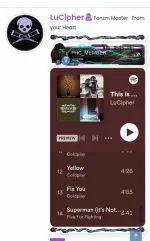
Paano gumawa ng ganito?

View attachment 2599982
To add a Spotify playlist in your profile signature, you can follow these steps:

Go to your Spotify account and create a public playlist.

Copy the playlist's URL from the address bar.

Go to your Phcorner account and click on your profile icon at the top right corner.

Click on "Signature" from the drop-down menu.

In the signature editor, click on the "Insert Media" button (the one with a film strip icon).

In the "Insert Media" dialog box, select "Insert Media" from the drop-down menu and then paste the Spotify playlist URL in the "Media URL" field.

Click on "Insert" to add the Spotify playlist to your signature.

You can preview your signature and then click on "Save Changes" to save it.

Once you have saved your signature, the Spotify playlist will be displayed in your profile signature.
 
To add a Spotify playlist in your profile signature, you can follow these steps:

Go to your Spotify account and create a public playlist.

Copy the playlist's URL from the address bar.

Go to your Phcorner account and click on your profile icon at the top right corner.

Click on "Signature" from the drop-down menu.

In the signature editor, click on the "Insert Media" button (the one with a film strip icon).

In the "Insert Media" dialog box, select "Insert Media" from the drop-down menu and then paste the Spotify playlist URL in the "Media URL" field.

Click on "Insert" to add the Spotify playlist to your signature.

You can preview your signature and then click on "Save Changes" to save it.

Once you have saved your signature, the Spotify playlist will be displayed in your profile signature.
Salamat ng husto
 
Status
Not open for further replies.

About this Thread

  • 4
    Replies
  • 69
    Views
  • 3
    Participants
Last reply from:
kenbravo29

Trending Topics

Online now

Members online
1,192
Guests online
1,151
Total visitors
2,343

Forum statistics

Threads
2,287,097
Posts
29,042,358
Members
1,216,370
Latest member
thomasianfcker
Back
Top