 PH
PH-
Welcome to PHCorner Forums! Sign up for free to unlock full access and exclusive privileges, including:
- Asking questions about computer and mobile issues
- Discovering internet tips for your mobile network and computer
You are using an out of date browser. It may not display this or other websites correctly.
You should upgrade or use an alternative browser.
You should upgrade or use an alternative browser.
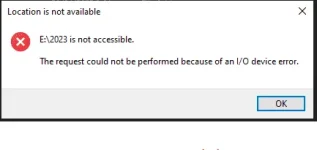
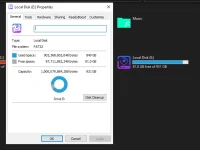
❓ Help External Hard Drive I/O Device Error not accessible.
- Thread starter iamramzkie
- Start date
- Status
- Not open for further replies.
🤖
🤖
Hello! I'm sorry to hear about your external hard drive issues. It sounds like your hard drive may have become corrupted, which is why it is showing up as a RAW file system.
Here are some steps you can try to recover your files:
1. Run data recovery software: There are a number of data recovery programs available that can help recover files from a corrupted hard drive. Some popular options include Recuva, EaseUS Data Recovery Wizard, and Disk Drill.
2. Use disk management tools: Windows has a built-in disk management tool that can help repair a corrupted hard drive. You can access it by right-clicking on the Start button and selecting Disk Management. From there, you can try to repair any errors on the disk.
3. Format the drive: If all else fails, you may need to format the drive and start from scratch. Keep in mind that formatting the drive will erase all data, so be sure to back up anything you want to keep before proceeding.
I hope these suggestions help you recover your data! Let me know if you have any other questions or concerns.
Here are some steps you can try to recover your files:
1. Run data recovery software: There are a number of data recovery programs available that can help recover files from a corrupted hard drive. Some popular options include Recuva, EaseUS Data Recovery Wizard, and Disk Drill.
2. Use disk management tools: Windows has a built-in disk management tool that can help repair a corrupted hard drive. You can access it by right-clicking on the Start button and selecting Disk Management. From there, you can try to repair any errors on the disk.
3. Format the drive: If all else fails, you may need to format the drive and start from scratch. Keep in mind that formatting the drive will erase all data, so be sure to back up anything you want to keep before proceeding.
I hope these suggestions help you recover your data! Let me know if you have any other questions or concerns.
- Status
- Not open for further replies.
About this Thread
-
1Replies
-
1KViews
-
1Participants
Last reply from:
Unknown user
Unknown user
New Topics
-
Using Codex CLI for Coding Efficiently
- Started by missterry
- Replies: 1
- ❓ Computer Discussion & Support
-
Pasabit Autocad Invites
- Started by Kryptonite18
- Replies: 0
- ❓ Computer Discussion & Support
-
FB ban and cant create new
- Started by VedfacR
- Replies: 3
- ❓ Computer Discussion & Support
-
Suggest VA job websitrs na legit
- Started by mitchmp
- Replies: 0
- ❓ Computer Discussion & Support
-
Calculator Emulator (Canon F789SGA I or II)
- Started by DDankii
- Replies: 0
- ❓ Computer Discussion & Support
-
Laptop Price for 2027
- Started by sisig with egg
- Replies: 0
- ❓ Computer Discussion & Support
-
Is this graphic card issue?
- Started by markjson
- Replies: 2
- ❓ Computer Discussion & Support
-
SoungHub No Sound Encountered
- Started by pow_tah
- Replies: 2
- ❓ Computer Discussion & Support
-
Apk to ipk any idea how to make it?
- Started by a s a r k a n a b a
- Replies: 1
- ❓ Computer Discussion & Support
Trending Topics
Online now
- Members online
- 398
- Guests online
- 4,497
- Total visitors
- 4,895