❓ Help Mouse and keyboard Macro

Status
Not open for further replies.
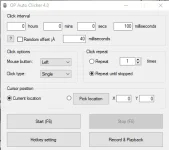
Hello! Can you please specify which program you are currently using for mouse and keyboard macro? It will help me suggest better alternatives for you. Thank you.
 
AutoClicker
Thank you for clarifying. Here are some alternatives to AutoClicker that you may find useful:

1. Pulover's Macro Creator: This free, open-source software allows you to automate repetitive tasks, including mouse clicks and keyboard inputs. It has a user-friendly interface and supports scripting in multiple programming languages.

2. Macro Recorder: This program lets you record and playback mouse and keyboard actions, as well as create and edit macros. It also has a built-in scheduler to automate tasks.

3. TinyTask: This is a lightweight macro recorder that allows you to automate mouse clicks and keyboard inputs. It has a simple interface and can be used for basic automation tasks.

4. AutoHotkey: This free, open-source scripting language lets you automate almost any task on your computer, including mouse clicks and keyboard inputs. It has a steep learning curve, but is very powerful and customizable.

I hope these suggestions are helpful! Let me know if you have any other questions.
 
Thank you for clarifying. Here are some alternatives to AutoClicker that you may find useful:

1. Pulover's Macro Creator: This free, open-source software allows you to automate repetitive tasks, including mouse clicks and keyboard inputs. It has a user-friendly interface and supports scripting in multiple programming languages.

2. Macro Recorder: This program lets you record and playback mouse and keyboard actions, as well as create and edit macros. It also has a built-in scheduler to automate tasks.

3. TinyTask: This is a lightweight macro recorder that allows you to automate mouse clicks and keyboard inputs. It has a simple interface and can be used for basic automation tasks.

4. AutoHotkey: This free, open-source scripting language lets you automate almost any task on your computer, including mouse clicks and keyboard inputs. It has a steep learning curve, but is very powerful and customizable.

I hope these suggestions are helpful! Let me know if you have any other questions.
noted for Pulover's Macro Creator try ko eto , kaso baka may mga magsuggest pa na ibang ka PHC :D
 
noted for Pulover's Macro Creator try ko eto , kaso baka may mga magsuggest pa na ibang ka PHC :D
Sure, here are some more alternatives to AutoClicker that you can also consider:

1. GS Auto Clicker - This is a simple and easy-to-use auto clicker that allows you to automate mouse clicks. It has customizable hotkeys and lets you choose the click interval.

2. Auto Mouse Clicker - This program lets you automate mouse clicks, keyboard inputs, and even record and playback mouse movements. It also has a built-in scheduler for task automation.

3. Free Mouse Clicker - A lightweight and portable auto clicker that lets you automate mouse clicks with customizable hotkeys.

4. Advanced Mouse Auto Clicker - This program lets you automate mouse clicks, keyboard inputs, and even simulate mouse movements. It has a built-in macro editor and scheduler for advanced automation tasks.

I hope these additional suggestions help! Let me know if you have any other questions.
 
Status
Not open for further replies.

About this Thread

  • 6
    Replies
  • 1K
    Views
  • 2
    Participants
Last reply from:
Unknown user

Trending Topics

Online now

Members online
467
Guests online
4,206
Total visitors
4,673

Forum statistics

Threads
2,304,619
Posts
29,160,989
Members
1,196,898
Latest member
yyy123
Back
Top