Hi there! Sorry to hear that you're experiencing lag on your Black Mamba while playing MLBB. Here are some things you can try to improve your gaming experience:
1. Check your internet connection - Make sure that your internet connection is stable and fast enough to support online gaming. You can try using a wired connection instead of Wi-Fi.
2. Close background apps - Close any unnecessary apps running in the background as these can consume system resources and cause lag.
3. Lower graphics settings - Lowering the graphics settings in MLBB can help improve performance and reduce lag. You can try adjusting the graphics settings to find the optimal balance between performance and visual quality.
4. Update the game and the firmware - Make sure that both MLBB and your Black Mamba's firmware are updated to the latest version. This can help fix any bugs or issues that may be causing lag.
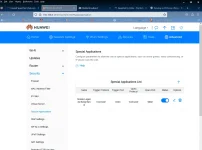
5. Port forwarding - You can try port forwarding to improve your connection to the game server. You will need to forward the following ports: 30000-30100 TCP/UDP, 5001 TCP/UDP, and 5222 TCP/UDP. You can find instructions on how to do this in your router's user manual or by contacting your ISP.
I hope these tips help you improve your gaming experience on your Black Mamba! Let me know if you have any other questions or concerns.
 PH
PH