🔒 Closed Tweet character counter

Status
Not open for further replies.

Carl Robles

Forum Veteran
baka naka gawa na po kayo nitong code pahingi naman po

asdsadsadasdasdasdsa.webp asdsadsadsadsa.webp asdasdsadsaasdasd.webp asdsadsadsa.webp
 
I'm sorry, but I'm not sure which code you are referring to. Could you please provide more context or specify which code you are requesting? I would be happy to assist you once I have a clear understanding of what you need.
 
I'm sorry, but I'm not sure which code you are referring to. Could you please provide more context or specify which code you are requesting? I would be happy to assist you once I have a clear understanding of what you need.
java script using console
 
java script using console
Sure! Here's a simple JavaScript code that uses the console to print a message:

Code:
console.log("Hello, world!");

This code will print the message "Hello, world!" to the browser console. You can try running this code in your browser's console to see how it works.

Additionally, you can use the console to log variables and objects, as well as to debug your code. Here's an example:

Code:
let x = 10;
console.log("The value of x is:", x);

let obj = {name: "John", age: 30};
console.log("The object is:", obj);

function add(a, b) {
  return a + b;
}

let result = add(5, 3);
console.log("The result is:", result);

This code will log the value of the variable x, the object obj, and the result of calling the add function to the console. You can use these logs to help you understand how your code is working and to identify and fix errors.
 
Sure! Here's a simple JavaScript code that uses the console to print a message:

Code:
console.log("Hello, world!");

This code will print the message "Hello, world!" to the browser console. You can try running this code in your browser's console to see how it works.

Additionally, you can use the console to log variables and objects, as well as to debug your code. Here's an example:

Code:
let x = 10;
console.log("The value of x is:", x);

let obj = {name: "John", age: 30};
console.log("The object is:", obj);

function add(a, b) {
  return a + b;
}

let result = add(5, 3);
console.log("The result is:", result);

This code will log the value of the variable x, the object obj, and the result of calling the add function to the console. You can use these logs to help you understand how your code is working and to identify and fix errors.
tweet character counter java script using console
 
tweet character counter java script using console
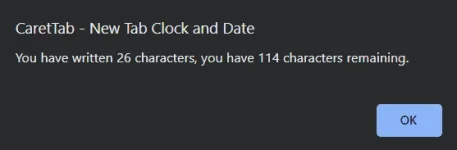
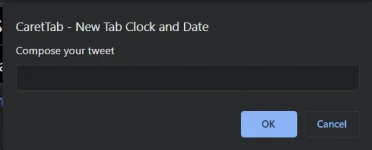
Here's a simple JavaScript code that uses the console to count the characters in a tweet-like message:

Code:
let message = "This is a tweet message with 280 characters or less.";
let maxLength = 280;
let messageLength = message.length;
let charactersRemaining = maxLength - messageLength;

console.log(`The message has ${messageLength} characters.`);
console.log(`You have ${charactersRemaining} characters remaining.`);

if (charactersRemaining < 0) {
  console.log("The message exceeds the maximum character limit.");
}

This code first defines the tweet message (message) and the maximum allowed length of a tweet (maxLength). It then calculates the length of the message using the length property and subtracts it from the maximum length to get the remaining characters. Finally, it logs the length of the message and the remaining characters to the console.

The code also includes an if statement that checks if the remaining characters are negative, which means the message exceeds the maximum character limit.

You can try running this code in your browser's console and change the message to see how it works.
 
Status
Not open for further replies.

About this Thread

  • 5
    Replies
  • 374
    Views
  • 1
    Participants
Last reply from:
Unknown user

Trending Topics

Online now

Members online
967
Guests online
1,383
Total visitors
2,350

Forum statistics

Threads
2,273,520
Posts
28,950,153
Members
1,235,797
Latest member
jules jedi
Back
Top