 PH
PHHow to post thread in PHc?
-
Welcome to PHCorner Forums! Sign up for free to unlock full access and exclusive privileges, including:
- Asking questions about computer and mobile issues
- Discovering internet tips for your mobile network and computer
You are using an out of date browser. It may not display this or other websites correctly.
You should upgrade or use an alternative browser.
You should upgrade or use an alternative browser.
🔒 Closed How to post thread in PHc?
- Thread starter P H C _ V A G A B O N D
- Start date
- Status
- Not open for further replies.
Solution
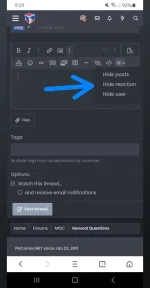
Hide reaction ka lang po boss tulad nyan sa pic
🤖
🤖
To post a thread in PHc, follow these steps:
1. Log in to your PHc account.
2. Go to the "General Questions" section of the forum.
3. Click the "New Topic" button.
4. Enter a descriptive title for your thread in the "Subject" field.
5. Write your post in the "Message" field. Be sure to provide enough detail and context for other members to understand your question or topic.
6. You can format your post using the available formatting options such as bold, italic, underline, etc.
7. If you want to add an image, click the "Insert Image" button and upload the image from your computer or provide a link to the image.
8. Review your post to make sure everything is correct.
9. Click the "Submit" button to post your thread.
Once you have posted your thread, other members of the community will be able to see it and respond with their own comments and suggestions.
1. Log in to your PHc account.
2. Go to the "General Questions" section of the forum.
3. Click the "New Topic" button.
4. Enter a descriptive title for your thread in the "Subject" field.
5. Write your post in the "Message" field. Be sure to provide enough detail and context for other members to understand your question or topic.
6. You can format your post using the available formatting options such as bold, italic, underline, etc.
7. If you want to add an image, click the "Insert Image" button and upload the image from your computer or provide a link to the image.
8. Review your post to make sure everything is correct.
9. Click the "Submit" button to post your thread.
Once you have posted your thread, other members of the community will be able to see it and respond with their own comments and suggestions.
Mga master pano po Kaya Yung emoji react muna para maview MO Yung hidden file kagaya nung nasa pic
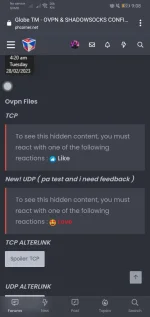
Hide reaction ka lang po boss tulad nyan sa pic
thank you master try ko
yung sa spoiler master panu ba gamitin ?
- Status
- Not open for further replies.
Similar threads
-
AI Wasn't In the Room How to Position Your Unique Experience and Expertise in the Age of AI
- Started by 0dayreleaser
- Replies: 0
About this Thread
-
4Replies
-
1KViews
-
2Participants
Last reply from:
P H C _ V A G A B O N D
P H C _ V A G A B O N D
New Topics
-
Been out for weeks, gulat ako sa notifs hahaha
- Started by PHC-Yoshi
- Replies: 0
- 💬 Chitchat
-
BREAKING: RIP Ate Gay
- Started by Freenet Man
- Replies: 0
- 💬 Chitchat
-
HI, DI PO AKO MAG BEBENTA ASK LANG AKO
- Started by Miamor0818
- Replies: 4
- 💬 Chitchat
-
FREE SHOPEE VIP 1 Month- 12Months!
- Started by Sakuragiii
- Replies: 3
- 💬 Chitchat
-
Pa help po sa vertocrate, please
- Started by fhadzlhee
- Replies: 0
- 💬 Chitchat
-
PA HELP NAMAN PO SA DUMMY ACCOUNT GMAIL
- Started by Mina65
- Replies: 0
- 💬 Chitchat
-
ADOBE XD Installer
- Started by YATO GOD
- Replies: 0
- 💬 Chitchat
-
Paano maging elite ulit
- Started by LYRA09
- Replies: 0
- 💬 Chitchat
-
Claude or ᑕᕼᗩTGᑭT for vibecoding?
- Started by mrmakuleet
- Replies: 1
- 💬 Chitchat
-
Testing bb codes
- Started by zzznoob
- Replies: 0
- 💬 Chitchat
Trending Topics
Online now
- Members online
- 363
- Guests online
- 5,597
- Total visitors
- 5,960